- September
- September 30, 2026: Various improvements and bug fixes
- September 24, 2026: Filter widget | Filter widget's own parameters referenced by filter widget data source
- September 23, 2026: UI | Path helper enhanced in Configuration Management, Data Browser, and Filter widget
- September 07, 2026: UI | Credentials added to pipeline environment configuration
- September 04, 2026: UI | Credentials added as Authorization Type to Event Subscription REST action
- September 03, 2026: Chart widget | Legend position (side/below/overlay) made configurable
- September 02, 2026: Table widget | Limit option is added for the column filter tooltip
- September 01, 2026: White Labeling | Global filters add/remove synchronization provided
- August
- August 24, 2026: Input widget | Configure selection fields with less effort
- August 24, 2026: Python examples | Create container steps more easily
- August 21, 2026: Environment variables | Identify invalid names while configuring pipelines and credentials
- August 20, 2026: Value widget | List layout provided
- August 19, 2026: Upload widget | Receive clear feedback when an upload is too large
- August 19, 2026: Input widget | Dynamic sections supported
- August 18, 2026: UI | Credentials added as Authorization Type to REST request definitions
- August 17, 2026: Calendar widget | Filters added for Booking status and custom properties
- August 14, 2026: Calendar widget | Confirmation e-mail received from device
- August 13, 2026: Project stats widget | Container images number and storage size visualized
- August 12, 2026: Query template versioning | 'Show Difference' view implemented
- August 11, 2026: Calendar widget | Keep all recipients when cloning a booking
- August 11, 2026: Filter widget | Error message is displayed to prevent object use
- August 10, 2026: Container registry | Usage metric added in the billing
- August 07, 2026: UI | Admin UI implemented for managing project credentials
- August 04, 2026: Input widget | Search and auto-complete supported in dynamic selections
- August 03, 2026: Table widget | Columns pinned to the left or right
- July
- July 30, 2026: Dashboards | Continue working when a filter data source is empty
- July 30, 2026: Calendar widget | See all configured device properties in a resource
- July 29, 2026: REST requests | Recognize authorization errors at a glance
- July 28, 2026: Input data | Add metadata to files at any time
- July 27, 2026: REST requests | Use responses from services with non-standard success codes
- July 27, 2026: Chart widgets | Read chart values correctly when traces use the same labels
- July 24, 2026: Event Subscriptions | Request body behavior updated for GET and DELETE http operations
- July 23, 2026: Calendar widget | Booking dialogue improved
- July 22, 2026: Data source | JSON Data option provided
- July 22, 2026: Table widget | Create valid custom columns with confidence
- July 21, 2026: Query templates | Select the intended template every time
- July 21, 2026: Table widget | Keep filters and inputs synchronized while editing
- July 19, 2026: Table widget | Find actions quickly in large tables
- July 14, 2026: Bug fixing
- July 13, 2026: External Data Source | Return full response object option introduced
- July 08, 2026: Event subscriptions | Send authenticated HTTP requests securely
- July 08, 2026: Personal Reports | 'Last' option supported in monthly scheduler
- July 07, 2026: Query template | 'View Version' implemented for all previous versions
- July 06, 2026: Table widget | Placeholders supported in rich text columns
- July 02, 2026: Personal Reports | Start with a ready-to-use monthly schedule
- July 01, 2026: Action Button widget | Shimmer effect, and display response option added
- June
- June 30, 2026: Processing pipelines | Know when a pipeline update is required
- June 29, 2026: Custom processing steps | Reuse referenced payloads as processing input
- June 26, 2026: Upload widget | Upload device attachments larger than 1 GB
- June 24, 2026: Table widget | Keep dynamic titles correct after navigation
- June 24, 2026: Query Template | 'Restore' action implemented for previous versions
- June 23, 2026: Personal Reports | Schedule reports for the fourth week of the month
- June 23, 2026: Pipelines processing | Option provided to prevent the processing from failing due to non-fatal errors
- June 22, 2026: Chart widgets | Z-Axis Label and Trace Rename options added to Heatmap Chart
- June 22, 2026: External data sources | Use cached responses reliably
- June 19, 2026: Calendar widget | Add custom information to bookings
- June 16, 2026: Processing Information | Warnings enabled, including on failure reason
- June 15, 2026: Query templates | Versioning system implemented
- June 15, 2026: REST data sources | Use a data source immediately after creating it
- June 15, 2026: Table widget | Switch dashboards without leaving unusable filter popovers
- June 08, 2026: Processing information | See the actual status of processed data
- June 08, 2026: Input widget | Use relative time ranges without reloading the dashboard
- June 07, 2026: Reports | Download processed data as a PDF report
- June 07, 2026: Signals widget | Select all signals with one action
- June 07, 2026: File upload | See why an upload failed
- June 07, 2026: Device filters | Save and share filtered device views as links
- June 06, 2026: Data Browser and Simple Search | Find values containing a term
- June 04, 2026: Table widgets | Placeholders supported in Batch Processing
- June 01, 2026: Personal Reports | Configuration interface improved to allow adding, editing, or removing filters
- May
- May 28, 2026: Pipelines | Multi Output step added
- May 27, 2026: Pipelines | New Processing Finished Event introduced
- May 22, 2026: Third party libraries | SBOM file provided for customers
- May 21, 2026: MDF parser | Invalidation bit handling improved
- May 20, 2026: Freemarker | Version updated to 2.3.34
- May 19, 2026: Bosch IoT Insights parsers | Newly introduced A2L decoder parser
- May 18, 2026: Query Template | Query Template editor restructured into Tabs
- May 15, 2026: Faceted Search | Facet’s technical name linked to a query parameter from the query template
- May 05, 2026: Event actions | Array is allowed in the request body
- May 04, 2026: Data Browser | 'Go to last' and 'Number of filtered pages' options enabled
- April
- April 21, 2026: Personal reports | Reports improved with item count, time range, frequency indicator, and confirmation
- April 20, 2026: Pipeline system updates | Pipelines restarted in a maintenance window only
- April 15, 2026: Trial plan creation | Booking possible directly on the Homepage
- April 14, 2026: MongoDB query service | Result streaming failure is now reported
- April 10, 2026: Python 3.13 support | Deprecated Python 3.9 removed from processing pipeline image version
- April 09, 2026: API improvement | Partial and resumable downloads supported for input data
- March
- March 25, 2026: Upcoming API Changes | Legacy Endpoints phased out
- March 19, 2026: API improvement | Resumable-Upload PUT endpoint ensured to work from a browser
- March 18, 2026: API feature | REST API provided to delete custom widgets
- March 17, 2026: Collections | Access rights management added to Master Data type
- March 16, 2026: Processing information | Reprocessing supported for current data
- March 13, 2026: Table widget | Autocomplete supported for placeholders
- March 12, 2026: Dashboards | Grid layout improved
- March 11, 2026: Free plans | Action Button and Upload widgets enabled
- March 10, 2026: Global filters | General settings applied in different tabs
- March 09, 2026: Processing Pipeline | Performance improved for scaling over 4 instances
- March 05, 2026: Project Management Service API | Master data documents deleted by filter
- March 04, 2026: Query template | Atlas Search parameter type supported for Data type JSON
- February
- February 27, 2026: Table widget | Action Button column supported for sub iterator data source
- February 26, 2026: Reprocessing Job API | Backward incompatible changes
- February 25, 2026: Reprocessing | Emit an event option added
- February 24, 2026: Data Browser search | Contains operator added to Operator selector button
- February 09, 2026: Overview | Download Traffic added in Project stats widget
- February 05, 2026: Data Recorder Service | The maximum total upload size increased
- February 04, 2026: Event Services and Event Notifications | Test Button added for Subscription Actions
- February 03, 2026: Breadcrumbs | Navigation improved with currentURL parameter
- February 02, 2026: Usage and Estimated Costs | New metric Download Traffic introduced
- January
- January 27, 2026: Table widget | New parameter pageIndex supported
- January 26, 2026: Feedback banner | Placeholders supported
- January 23, 2026: Collections | Atlas Search view added
- January 22, 2026: Chart widgets | Personal reports available
- January 19, 2026: Data Transformation | Placeholder in JMES Path Query
- January 14, 2026: User APIs | New property naming
- January 13, 2026: Table widget | 'Clickable row' functionality extended to support multi action buttons
September
September 30, 2026: Various improvements and bug fixes
Throughout the month, along with the already reported new features and improvements, 20 internal tickets have been resolved, improving performance, stability and development speed. We have also made the following:
Improvements
- PSIRT shown in Footer to report Security Findings: https://psirt.bosch.com/
- Download allowed files after device has been deleted
- Missing descriptions included in Swagger API Documentation
Bug fixes
- Unable to delete a container image
- Grouping in Processing Status does not work with filters
- Index Creation Dialog not loading due to count query
- Table widget | Data display for filtering
- Table Widget | Overlapping value display
- Facet Search | Timezone not respected
- Charts | Plotly new version
- Table Widget | Table Widget with Rich text cell loads forever with many rows
- Query template | No access for a different user from the same project
- Date/Time formats | Incorrect for DE language and not correctly applied in widget previews
- Dashboards | Header title not always updated correctly
- Input History Filter uses 'contains' instead of 'equals' filter
- Action Hyperlink Buttons | Improve iteration on nested data source
- Chart | Preview ignores data source parameter default, uses filter widget default instead
- API Docs issue | rest-request-definition
pageAndSort - Rest Requests | Rest Requests calls to Delete Endpoint cause download
September 24, 2026: Filter widget | Filter widget's own parameters referenced by filter widget data source
Filter widget data source can reference filter widget's own parameters. This allows you in your dashboards driven by a filter widget, to use the filter's own global parameters inside the Query Template (and in data sources in general) that populates the filter widget itself.
What is not allowed is to configure a parameter in a way that its default value comes from the widget's own data source output while that same data source also reads the parameter. Then, a clear inline error message appears identifying the parameter that causes the dependency loop and offering the action to resolve the issue:

To learn more about the parameters, refer to Filter widget user guide.
September 23, 2026: UI | Path helper enhanced in Configuration Management, Data Browser, and Filter widget
In all queryable collections, the path helper is enhanced to provide more accurate autocomplete proposals. Now, the path proposals do not come just from the first object of the collection, but from the number of objects you define yourself as an admin. Also, you can define other path criteria like IDs, types, values, which you can provide in a Filter Query. To achieve this:
- In Configuration Management, on Admin → Collection → Details, we introduce a new section 'Path Info Configuration', so that you can view the current values, or the default values as in the example below, and edit the sample size and the filter query:
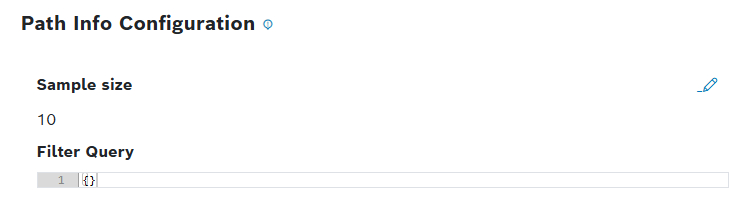
The Edit button opens a dialog with two fields:
- Sample size: Required field with integer input – min 1, max 1000, default 10
- Filter Query: Optional field, JSON editor, default {}
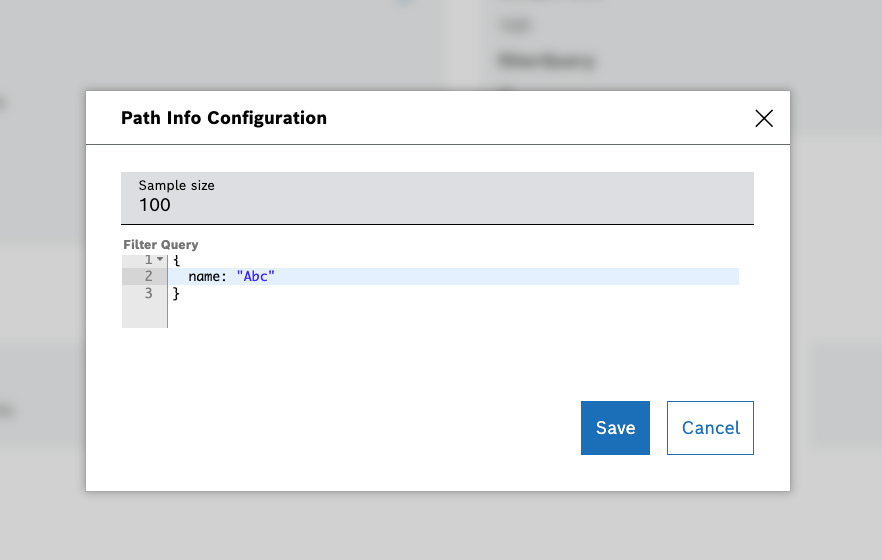
After you have created the 'Path Info configuration', the new default Data Browser's behavior changes accordingly.
- In Data Browser, a new Query Service endpoint generates path information just-in-time by sampling documents from a collection. This endpoint is used by the Data Browser Path Helper and Filter Widget to provide path suggestions without requiring pre-computed path information from a Query template. The endpoint dynamically samples documents based on your configuration and returns aggregated path metadata including types, example values, and occurrence counts.
- In Filter Widget edit panel's Data Source section, a new 'Path Info' source is now selectable from the Add Source dropdown list. Аvailable in the filter widget only, the Path Info can be used only once as a data source.
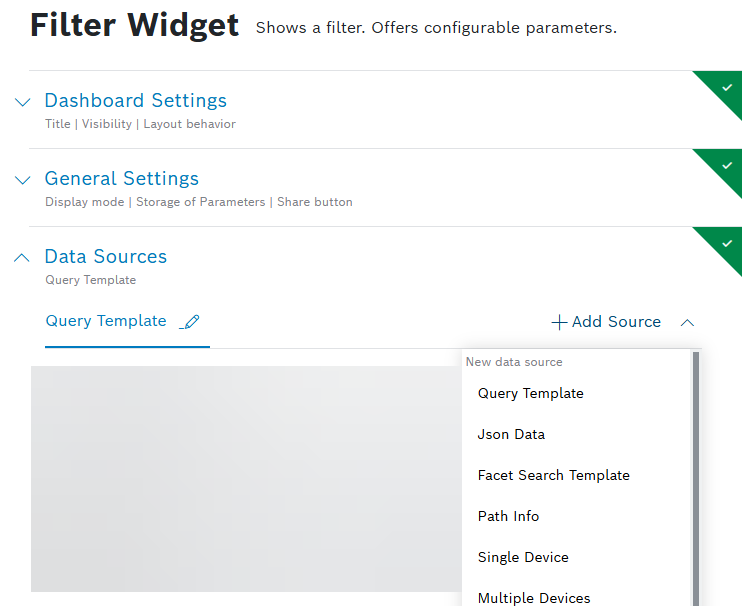
When you select the 'Path Info' source, you have to a) choose a collection to be used for path autocomplete, and b) save the data source.
After you have configured the 'Path Info' source, all query-condition parameters defined in advance in the 'Path Info Configuration' of the collection will automatically use the configuration for path autocomplete instead of paths derived from the main data source:
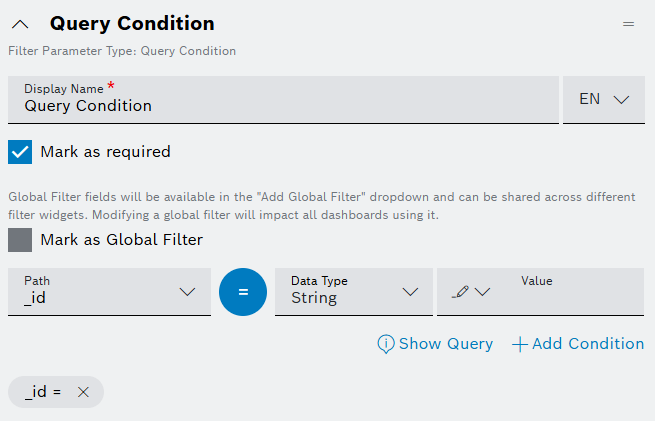
When no 'Path Info' source is configured, the new default behavior remains unchanged.
For more information about the Collections and the Filter widget, refer to Collections and Filter widget user guides.
September 07, 2026: UI | Credentials added to pipeline environment configuration
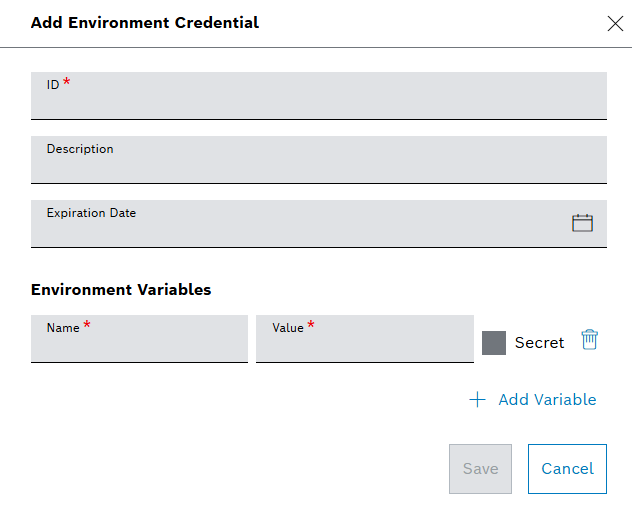
For pipelines steps of type custom and container, you can now assign credentials to the pipeline environment configuration using the Select Credentials dropdown list. The available environment credentials have been configured in advance in the Credentials Admin menu:
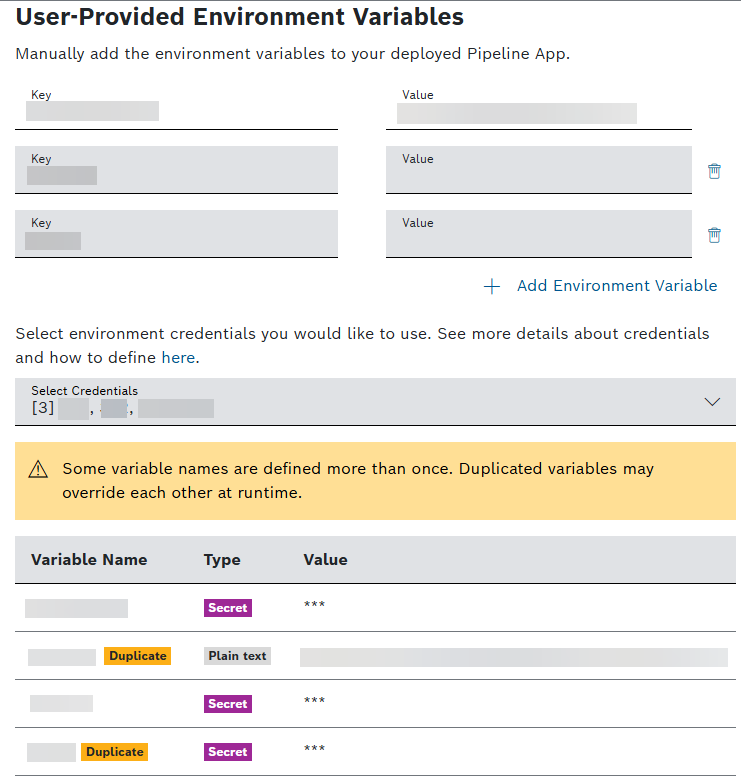
When you select a credential object, its variables are shown with their values аs read-only. The secret values are displayed as "***". Since you can combine your own user-provided variables with variables from credentials sources, the UI provides a waring about a possible override at runtime and indicates the duplication in a clear way:
For other details about pipelines, refer to Configuring a pipeline user guide.
September 04, 2026: UI | Credentials added as Authorization Type to Event Subscription REST action
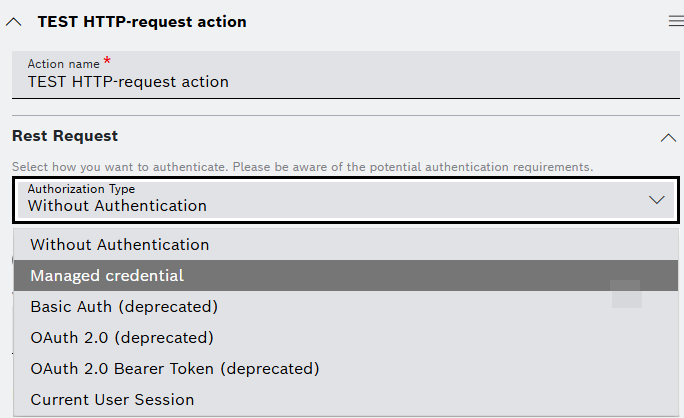
The Managed credential option as Authorization Type is now added in Event Subscription HTTP-request action configuration:
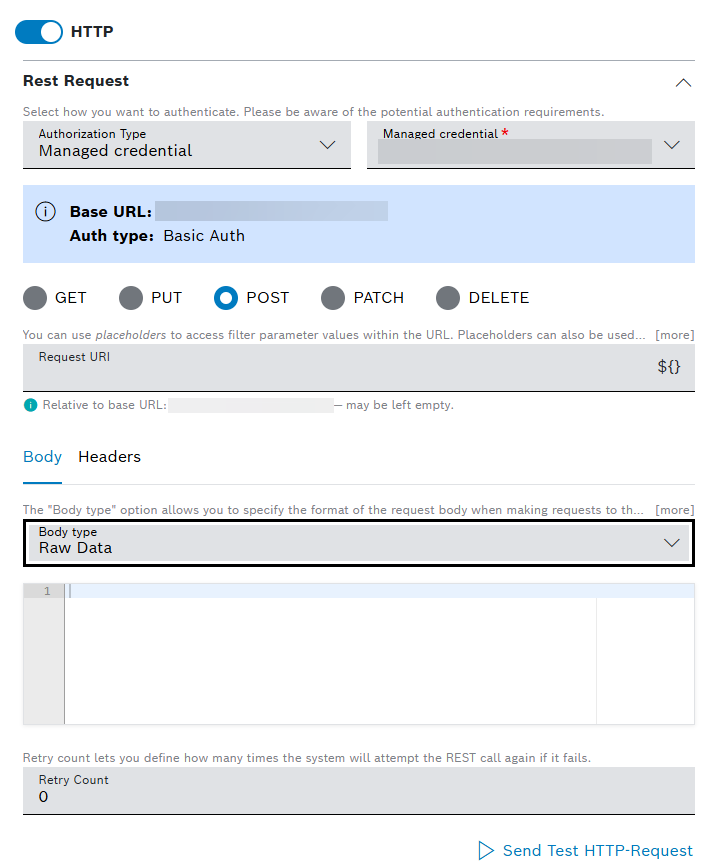
The Event Notifications of HTTP type also support the new Managed credential option:
For more details, refer to Event Service and Event Notifications user guides.
September 03, 2026: Chart widget | Legend position (side/below/overlay) made configurable
You are now able to configure the legend's position within the chart supporting legends by the new Legend Position dropdown list:
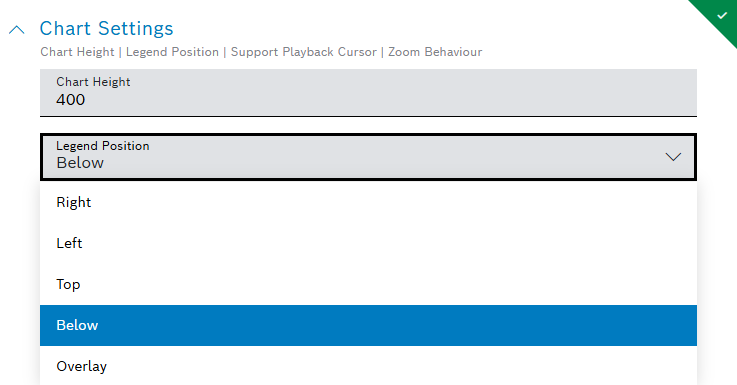
Learn more about the widget from Chart widgets user guide.
September 02, 2026: Table widget | Limit option is added for the column filter tooltip
When using the table widget, you can now search for a specific value in a short checkbox list or prefer to always use the advanced text input for consistency across all columns.
You can always switch between the filters with the Advanced Filter or Select from List buttons, e.g.:
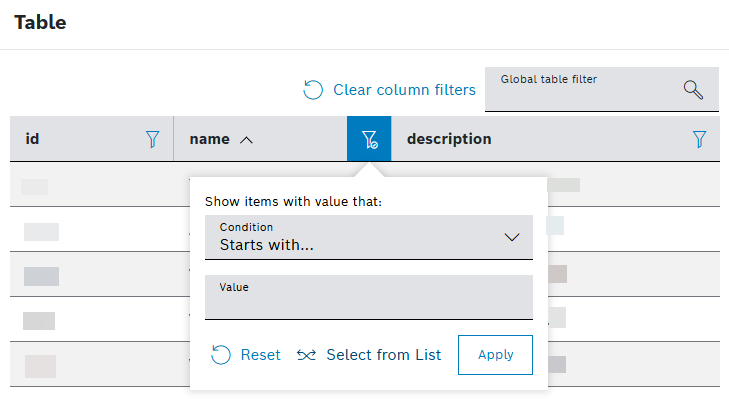
A new option – List display threshold – is provided to set the maximum number of items to show in the filter list, which is 1000 currently:
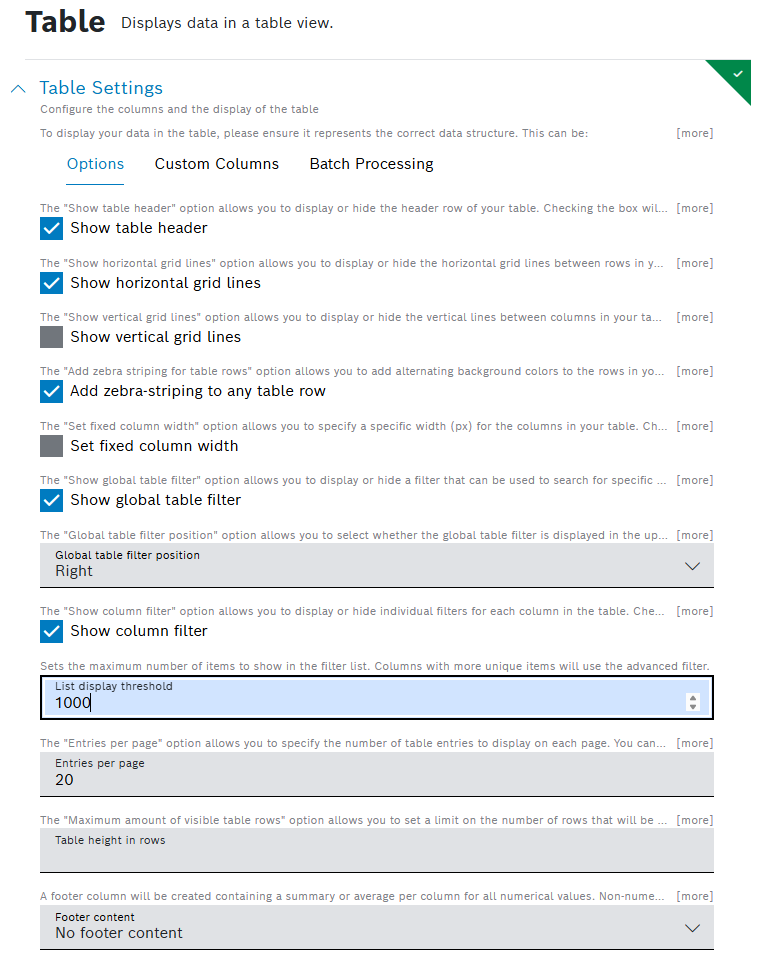
For entries above the threshold, only the advanced search is available.
For details, refer to Filtering the Table widget user guide.
September 01, 2026: White Labeling | Global filters add/remove synchronization provided
A new option under the white labeling menu allows you to turn on or off the synchronization across all your widgets when you add or remove global filters. This feature is turned off by default:
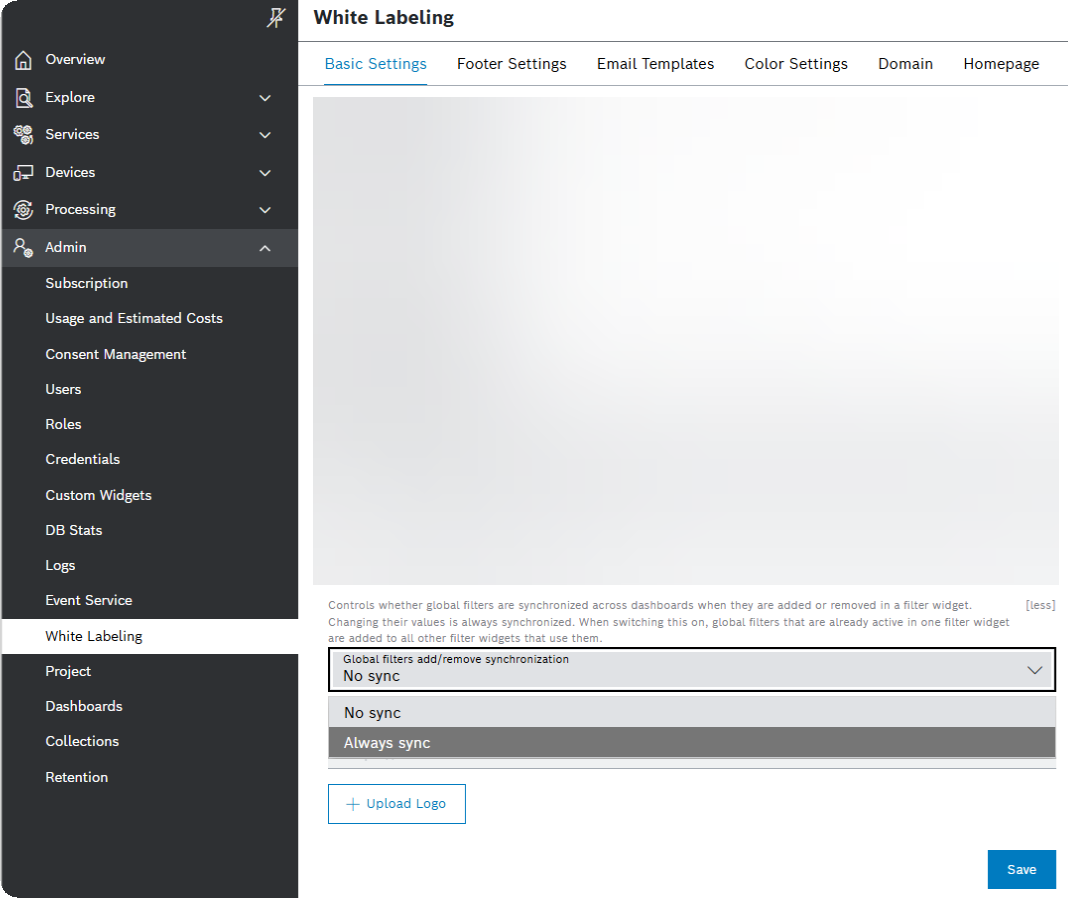
To learn more about other White Labeling options, refer to General Settings user guide. Find details about the Global filters in Filter Panel user guide.
August
August 24, 2026: Input widget | Configure selection fields with less effort
Selection fields are easier to configure because a separate label is no longer required when the input value already provides the necessary information. If no label is configured, the value is used as the label. Thus, you can apply their selection without entering redundant information.
For details about the widget, refer to Input widget user guide.
August 24, 2026: Python examples | Create container steps more easily
The Python examples now show how to create and use a container step. This gives you a working starting point for building processing pipelines with container-based steps.
August 21, 2026: Environment variables | Identify invalid names while configuring pipelines and credentials
Environment variable names are now checked consistently when credentials and pipeline configurations are created or updated. Invalid names are identified before they cause problems during pipeline execution. Supported names may contain letters, digits, dashes, dots, and underscores and may be up to 253 characters long.
To learn more about the variables, refer to the Adding environment variables section in Configuring a pipeline user guide.
August 20, 2026: Value widget | List layout provided
Now, our Value widget supports values shown as tiles, or as a list. These two options are accessible by selecting the new Options button. The field that opens provides a drop-down to allow you configure the Layout Type as Tiles or List: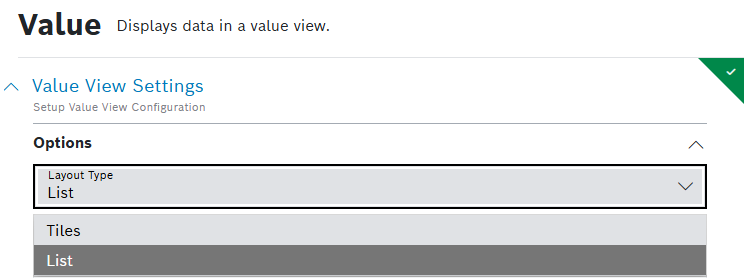
The result is visualized in the Widget Preview:
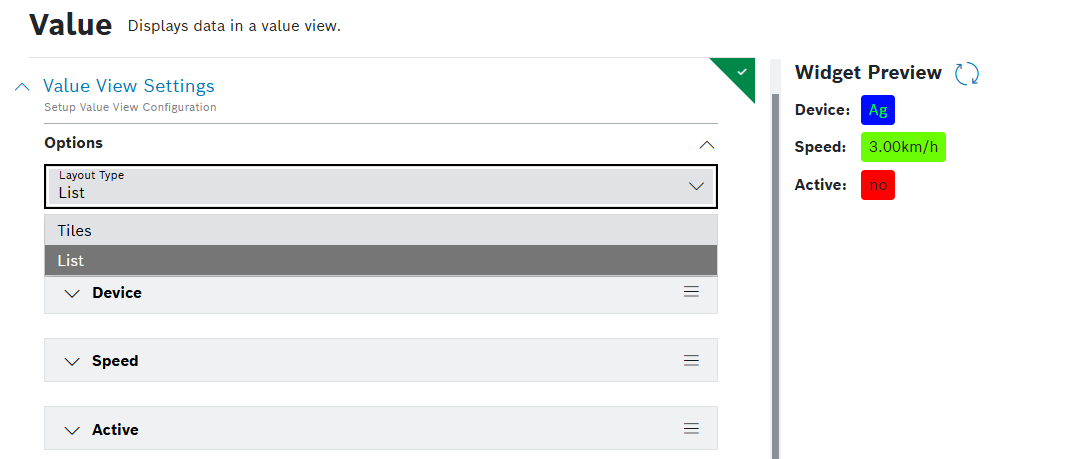
For more information about the widget, refer to Value user guide.
August 19, 2026: Upload widget | Receive clear feedback when an upload is too large
The generic pipeline processor now applies a configurable payload limit. If an upload is too large, it is rejected immediately with a processing status instead of running into a backend memory problem.
Fer details about the widget, refer to Upload widget user guide
August 19, 2026: Input widget | Dynamic sections supported
A new dynamic section option is provided - Repeatable Input Section – useful e.g. when you need more of the same couple of name and type fields when testing your devices, or for tasks with name and due date.
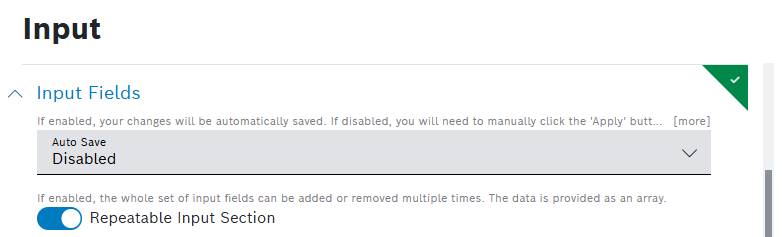
You can set translatable label for the adding dynamic section button like Add Device, or Add Task. In the example below, each time you select the  Add Task button, the option adds repeating sections of two new input fields Name and Done by: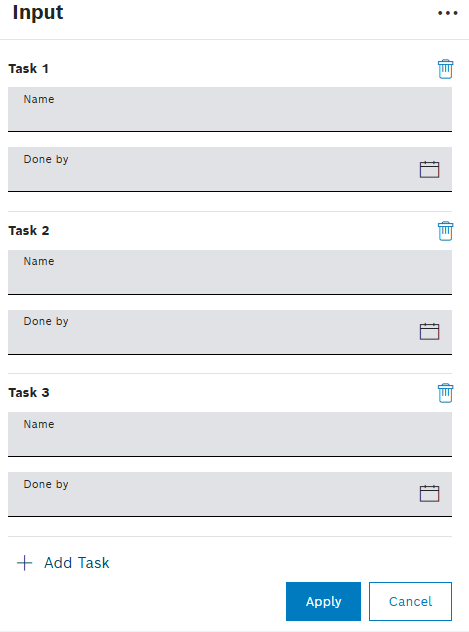
The new sections can be removed via a remove button.
To learn more about the Input widget, refer to Input widget user guide.
August 18, 2026: UI | Credentials added as Authorization Type to REST request definitions
A new Authorization Type option – Managed credential – is added in REST request configuration. This allows one credential to be configured centrally and then to be reused by selecting it from a list in different data sources and different REST request definitions. Now, when you configure a REST request, you select the Authorization Type first. The old authorization types – Basic Auth, OAuth 2.0 and OAuth Bearer Token – are marked as deprecated in brackets.
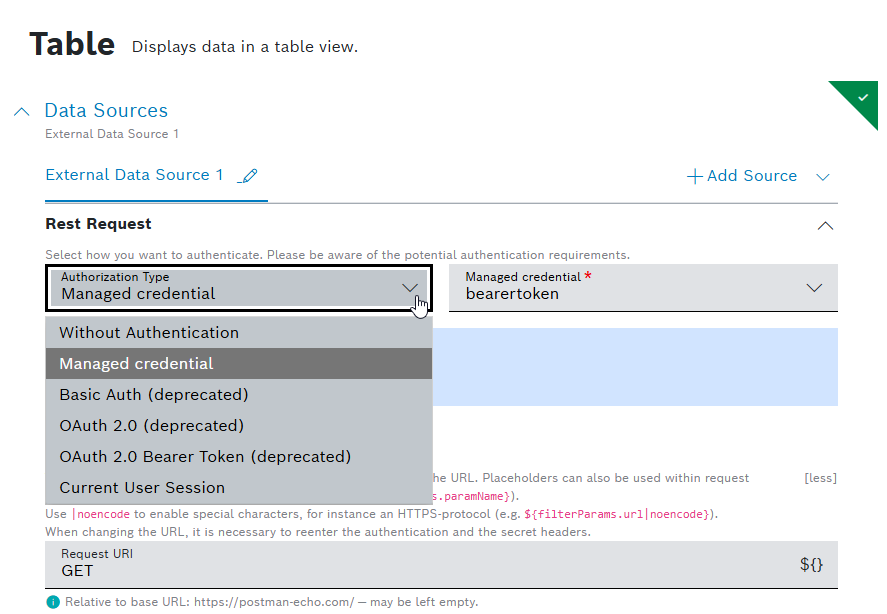
The new Managed credential option can be selected in External Data Source and REST Request Button Options, Table Action Button(HTTP Method) and Batch Action buttons configurations, as well as in configuring personal notifications. Upon selection, a drop-down list of all Managed credentials of type http which have been predefined centrally, is shown to be used in the neighboring field. When you select a credential object, an info dialog appears with its details – Base URL and Auth type – in a read only mode. A hint shows the configured Base URL and additional information that a relative path/URL can be used:
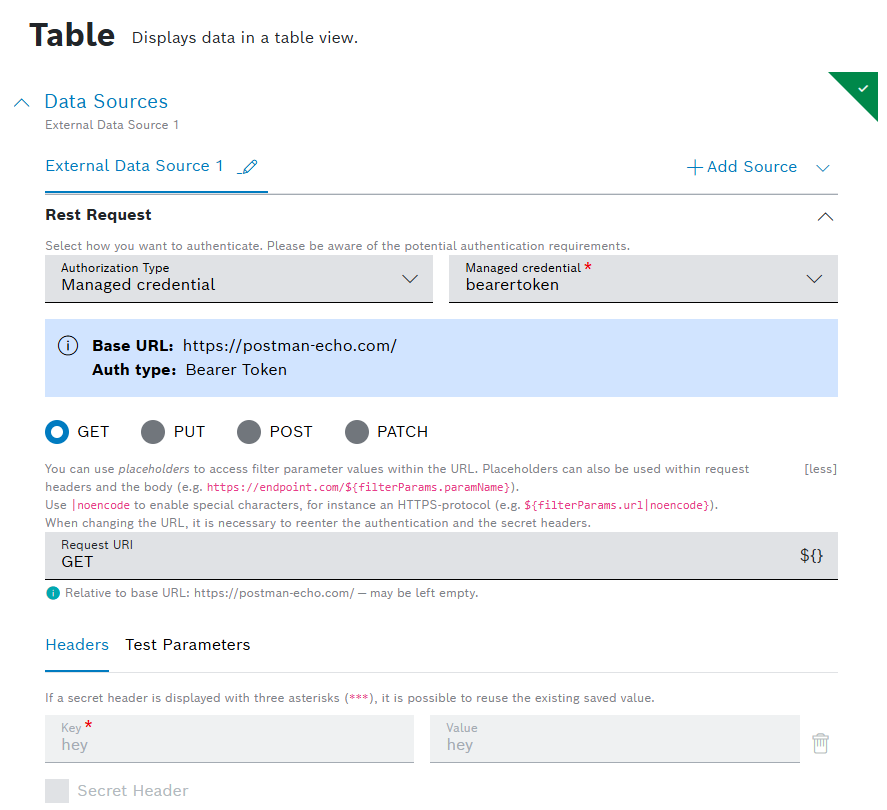
Below the hint, the headers will be displayed in a read only mode automatically if defined in advance while configuring the credential.
To learn more about Credentials, refer to Credentials user guide.
August 17, 2026: Calendar widget | Filters added for Booking status and custom properties
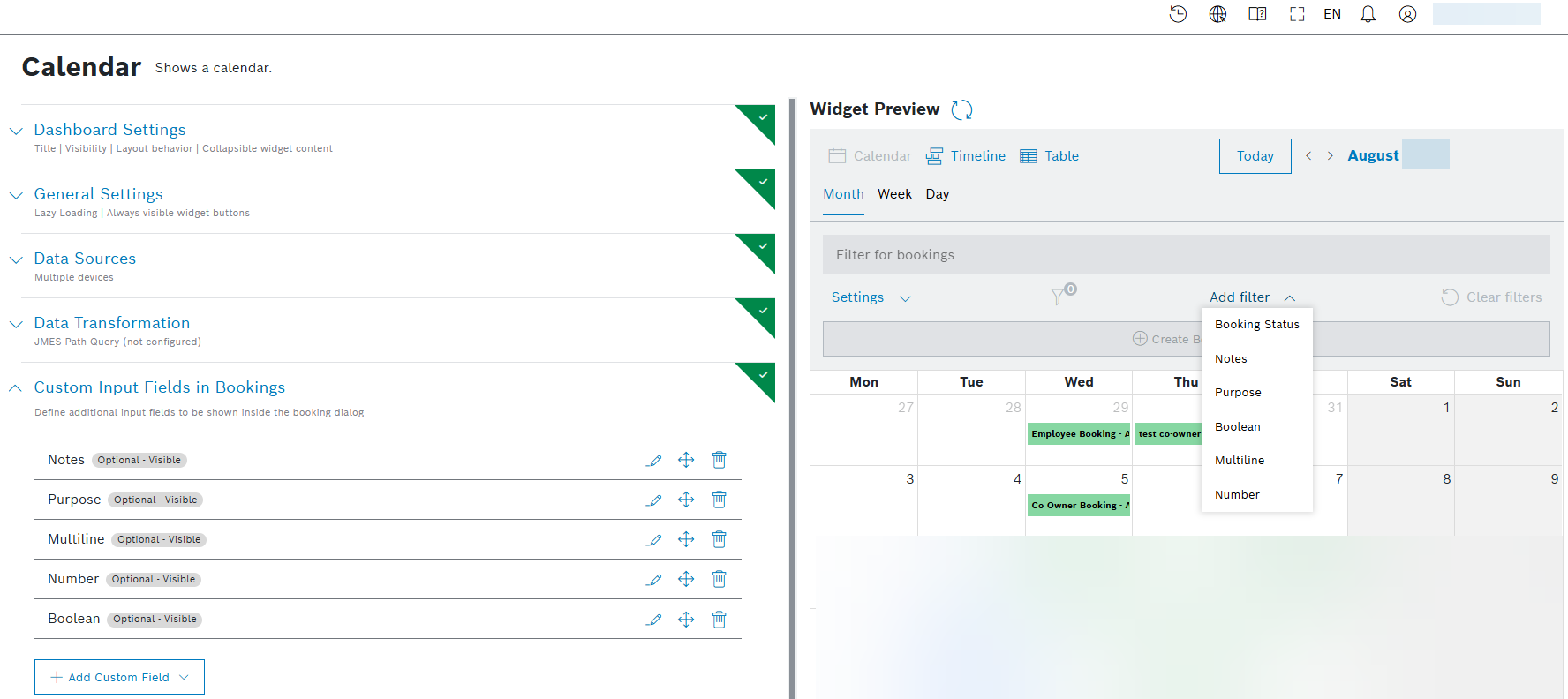
As a creator of a booking, you are now able to add custom properties, so that you can provide additional context and information about the booking that is relevant to your organization or workflow. The filter visualization has been extended to support searching by 'Custom Input Fields in Booking'. A new 'Add filter' button provides a dropdown list of all available filters to add:
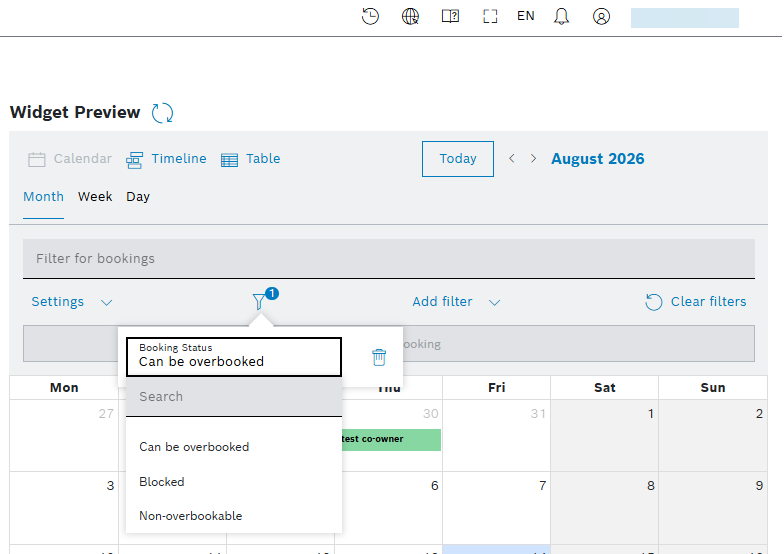
Introduced is a new filter icon showing how many filters are active. In the example below, there is one active filter:
For additional information about Calendar widget, refer to Calendar user guide.
August 14, 2026: Calendar widget | Confirmation e-mail received from device
For all bookable device types, you can specify a dedicated device property field containing a valid e-mail address. In the booking dialog, this e-mail address is entered automatically in the 'Confirmation E-Mail Addresses' field as soon as the device has been added to the booking.
In the following example, the e-mail addresses appear automatically after the devices have been selected during the creation of a new booking:
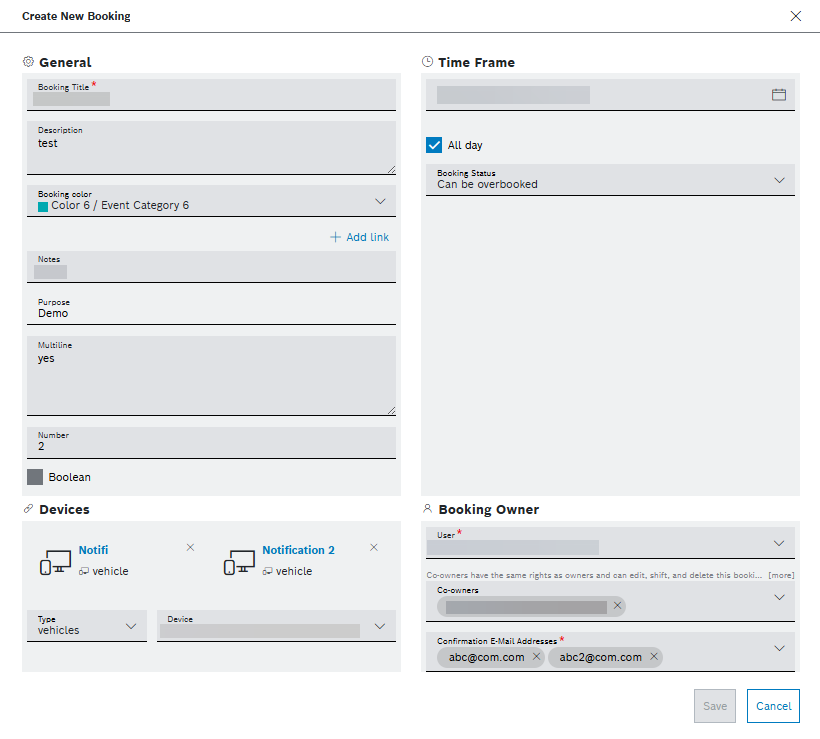
Learn more about how to create a new booking from Creating a booking user guide.
August 13, 2026: Project stats widget | Container images number and storage size visualized
The Project stats widget is extended so that you as a project admin are now able to see the count and the total size of the docker images that are pushed:
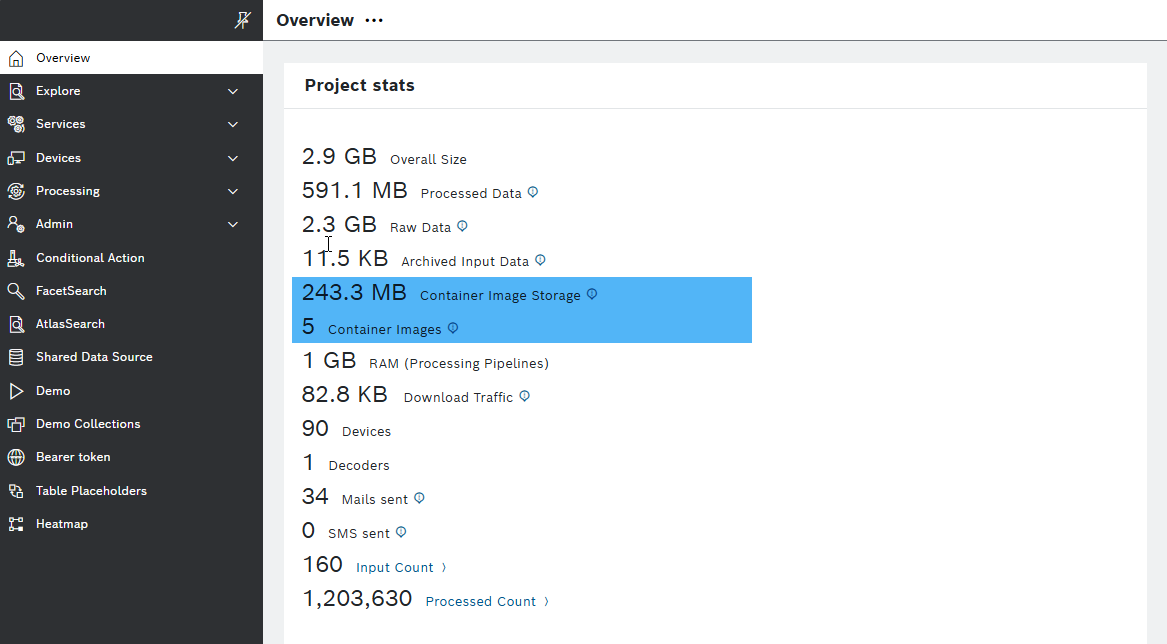
To learn more about the widget, refer to Project Stats user guide.
August 12, 2026: Query template versioning | 'Show Difference' view implemented
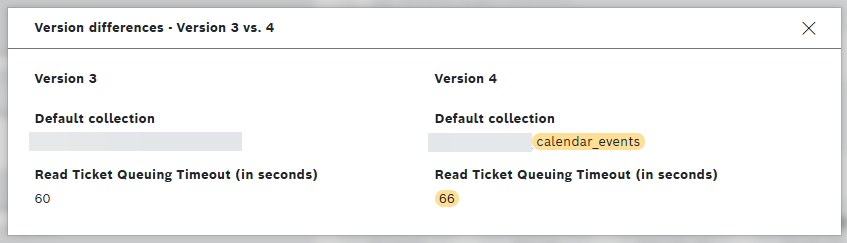
Now, you can compare two query template versions and explore the differences between them using the newly included Compare button inside the popover of the Version History list.

The comparison is always between the viewed version marked with a little blue circle and another selected version from the list to compare with by choosing the Compare button.
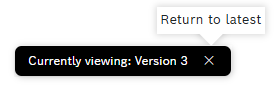
A notification displays the number of the currently viewed version. To return to the latest – Current version – select the close  button of the notification:
The differences between the two compared versions are highlighted in different color:
To change the couple to compare, view a version first by selecting the View version button:
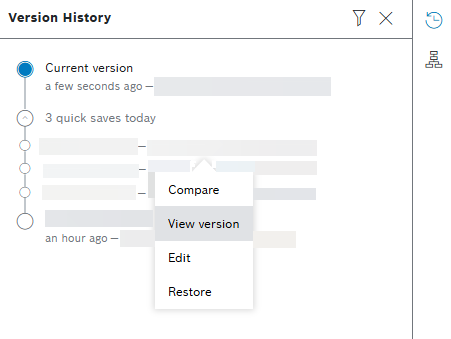
Then, select another version to compare with, using the Compare button.
For other details, refer to Versioning query template user guide.
August 11, 2026: Calendar widget | Keep all recipients when cloning a booking
When a calendar event with several confirmation email recipients is cloned, all configured recipients are copied to the new event. Now, you no longer need to re-enter the notification recipients after cloning a booking.
To learn more about the widget, refer to Calendar widget user guide.
August 11, 2026: Filter widget | Error message is displayed to prevent object use
When a miss-configuration of filter widget is added, e.g. objects are passed instead of values or array of values, an error message appears with the supported formats and prevents object passing in Filter widget.
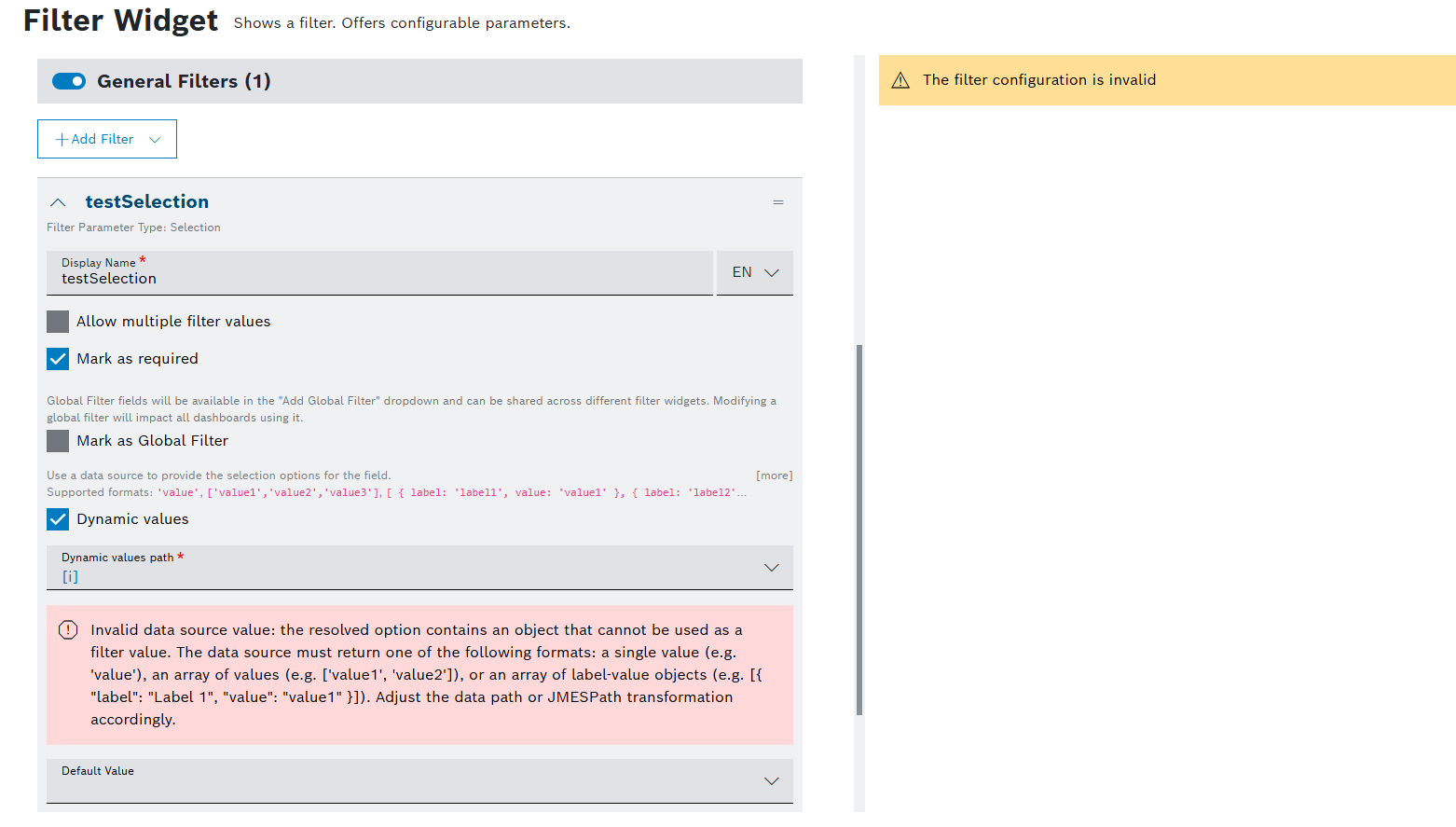
For more information about the Filter widget, refer to Filter user guide.
August 10, 2026: Container registry | Usage metric added in the billing
The size of the container registries belonging to a project is now included in the billing as part of the raw data usage.
August 07, 2026: UI | Admin UI implemented for managing project credentials
As an admin, you can now manage project credentials centrally via a new menu option under Admin, called Credentials:
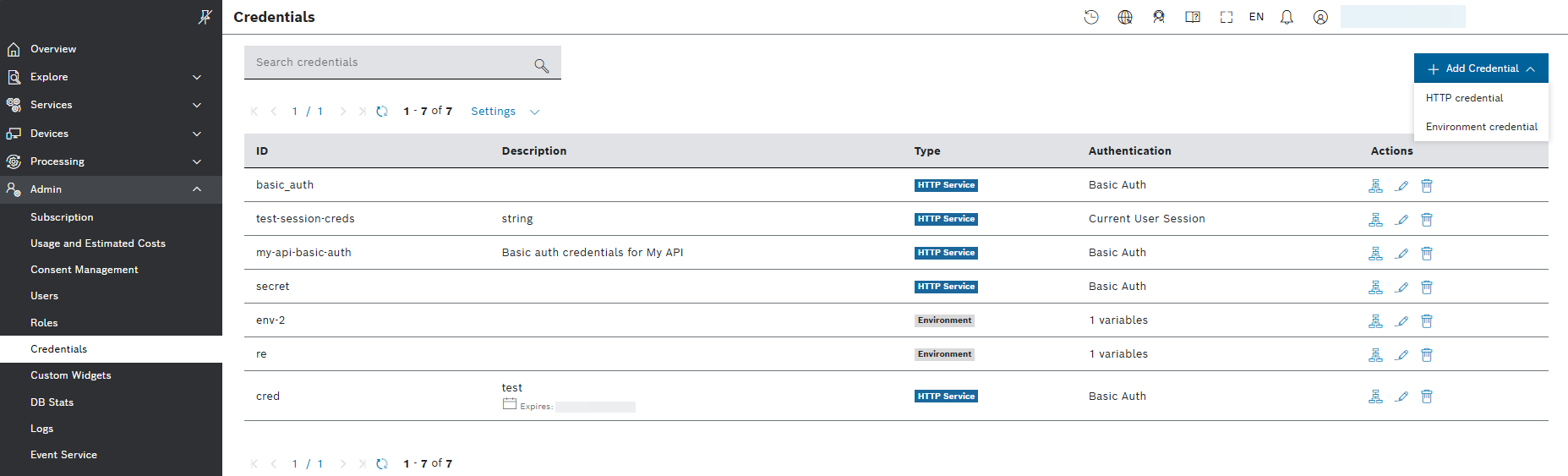
You can add credentials of HTTP and Environment types, edit and delete them, as well as see their usage:
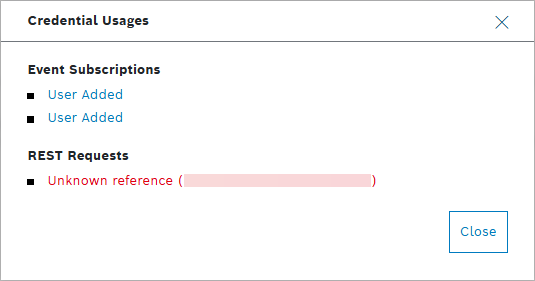
For more details, refer to Credentials user guide.
August 04, 2026: Input widget | Search and auto-complete supported in dynamic selections
A new filter field appears when you select the drop-down in Selection and Multi-selection types of input fields. The filter field allows search and auto-complete, so that you can quickly find and select the right value instead of typing the full entry or scrolling through a long list.
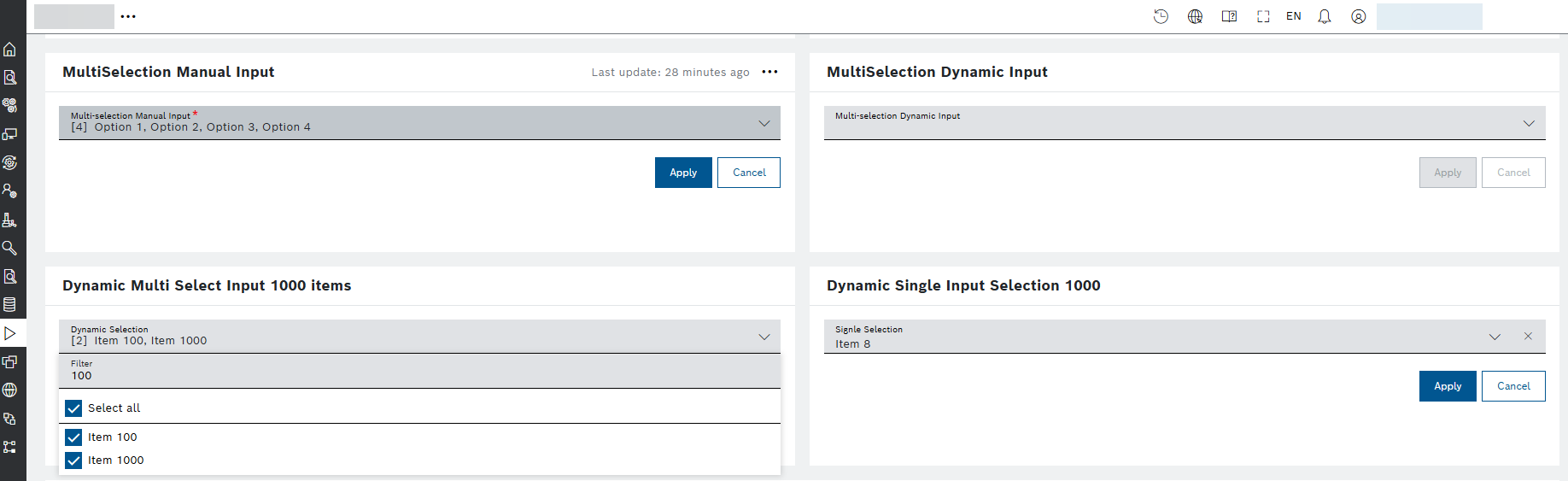
For details about the widget, refer to Input widget user guide.
August 03, 2026: Table widget | Columns pinned to the left or right
The Stick column horizontally checkbox in each column's Styling section has been replaced with a new Column Pinning drop-down. You can now choose:
- None - the column scrolls with the rest of the table (default).
- Stick to left - the column stays fixed on the left edge during horizontal scrolling.
- Stick to right - the column stays fixed on the right edge, keeping action buttons and key columns visible in wide tables.
Existing columns that were previously pinned via the old checkbox are automatically migrated to Stick to left - no action required.

For more details about the widget, refer to the Table widget user guide.
July
July 30, 2026: Dashboards | Continue working when a filter data source is empty
Dashboards now finish loading even when a filter data source returns no results. You can continue working with the dashboard instead of waiting for an endless loading state.
For details about the dashboards, refer to Dashboards user guide.
July 30, 2026: Calendar widget | See all configured device properties in a resource
Calendar resources now display all configured device properties, so that you can see the complete resource information when the calendar view is loaded.
For details about the widget, refer to Calendar widget user guide.
July 29, 2026: REST requests | Recognize authorization errors at a glance
REST request results now distinguish unauthorized responses from successful responses. A 401 response is shown with an error indicator and an appropriate message, making request failures easier to understand.
July 28, 2026: Input data | Add metadata to files at any time
The Input History edit dialog now lets you add custom metadata to files that do not have metadata entries yet, including in projects without predefined metadata fields.
Find details in Editing the metadata of an input history entry section of the Input History user guide.
July 27, 2026: REST requests | Use responses from services with non-standard success codes
REST request execution now forwards the response body for non-standard success status codes instead of treating the status as an unknown error. Widgets such as the Rich Text widget can therefore use the returned response as expected.
July 27, 2026: Chart widgets | Read chart values correctly when traces use the same labels
Chart rendering now displays values consistently when different traces use identical labels, for example when a bar trace and a line trace share the same labels.
For more information about the chart widgets, refer to Chart widgets user guide.
July 24, 2026: Event Subscriptions | Request body behavior updated for GET and DELETE http operations
When making requests to the REST API, the Body option allows you to create an HTTP DELETE action with request body.
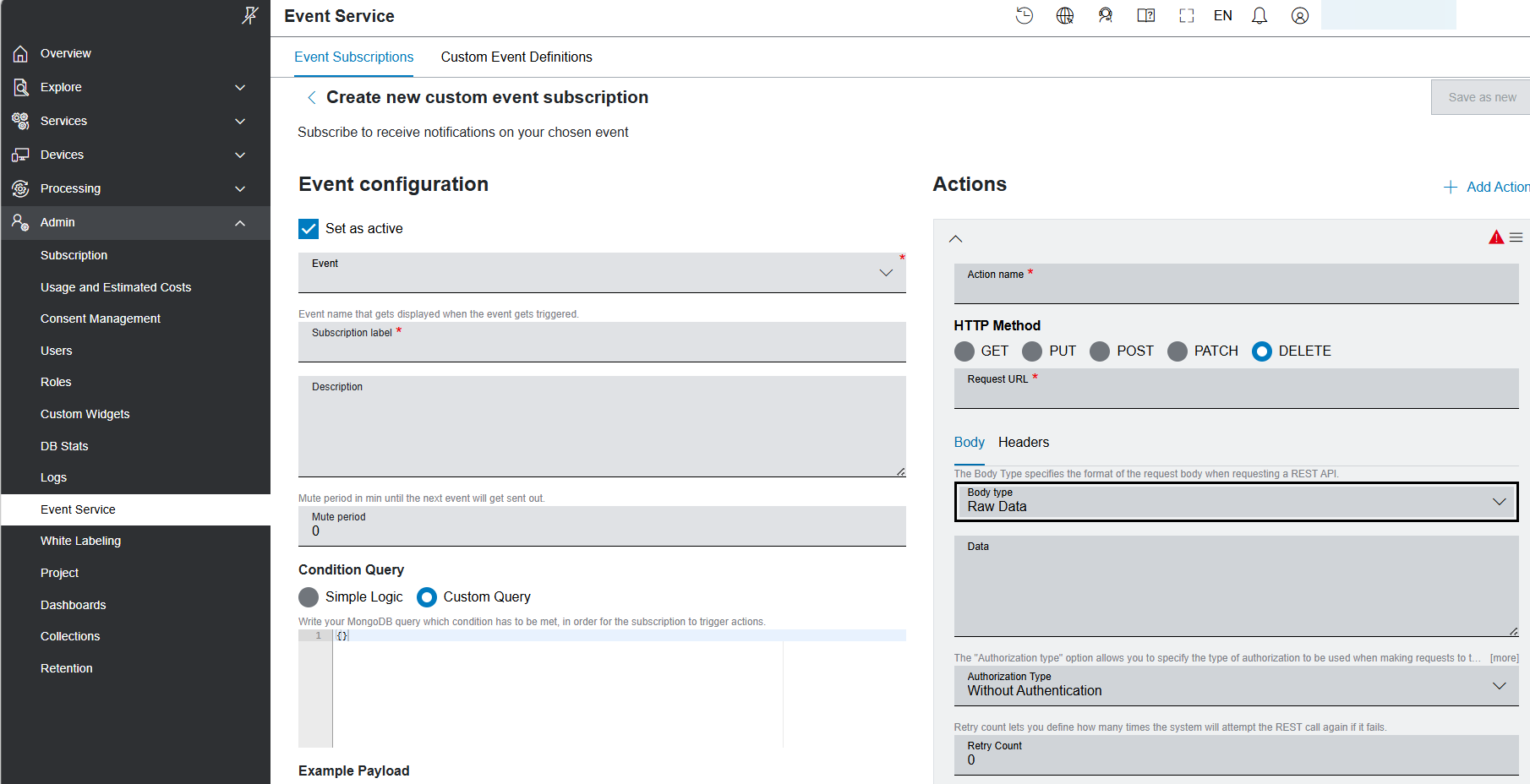
The Body option is not available for the GET HTTP method.
For more information about the Event Service, refer to Event Service user guide.
July 23, 2026: Calendar widget | Booking dialogue improved
In the booking dialogue, we provided the option to add co-owners with the same rights as the owner. This is of great importance when existing bookings can no longer be changed if their owner is on vacation, on sick leave, or has left the company.
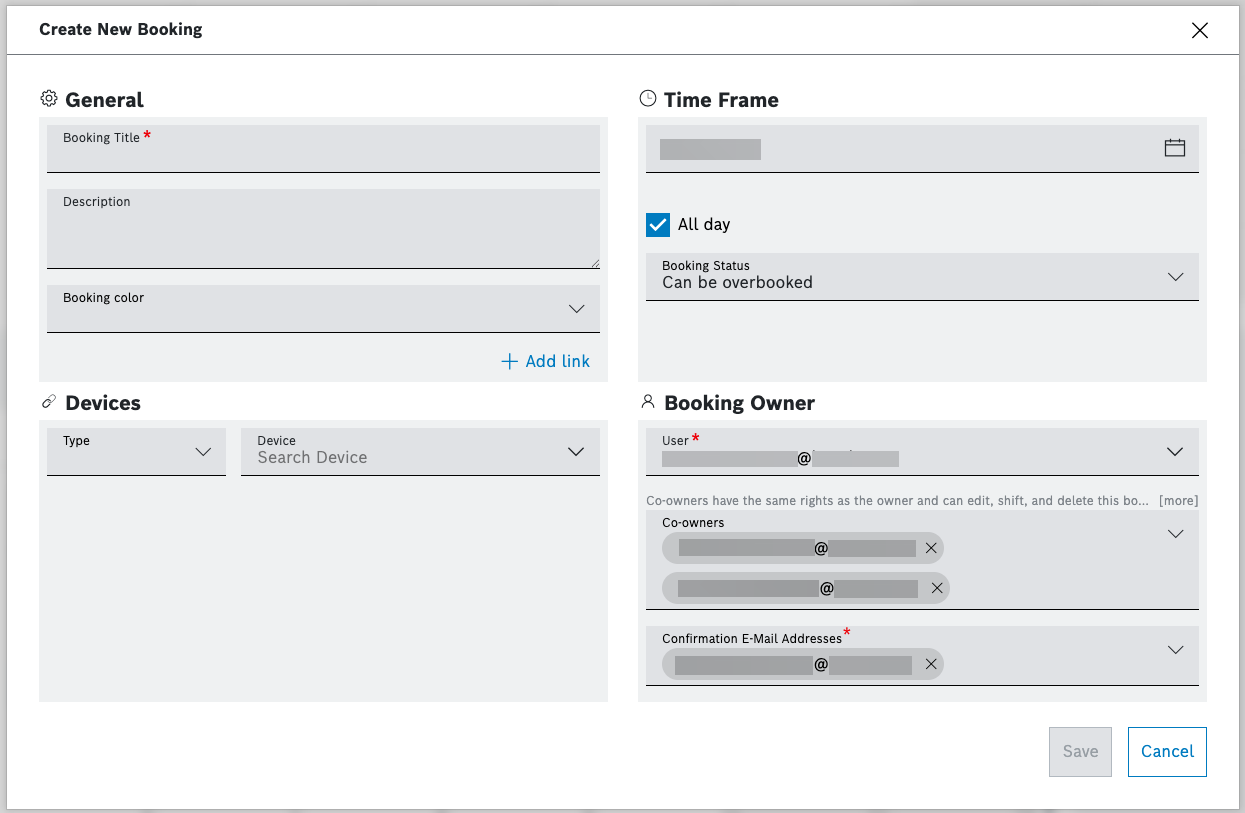
You also have the option to filter, and choose by check-boxes from a drop-down menu the confirmation email addresses (required):
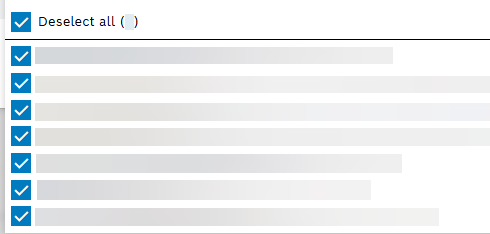
Learn more about the widget in Calendar and Creating a booking user guides.
July 22, 2026: Data source | JSON Data option provided
The new JSON Data option is available in the drop-down list of the Data Sources for most of the widgets. Use that option to provide static JSON data that is stored within the widget configuration and merged with dynamic data sources — useful for chart thresholds, label mappings, or fixed lookup data.
The toolbar above the editor allows you to undo, redo, format, or copy the current JSON content:
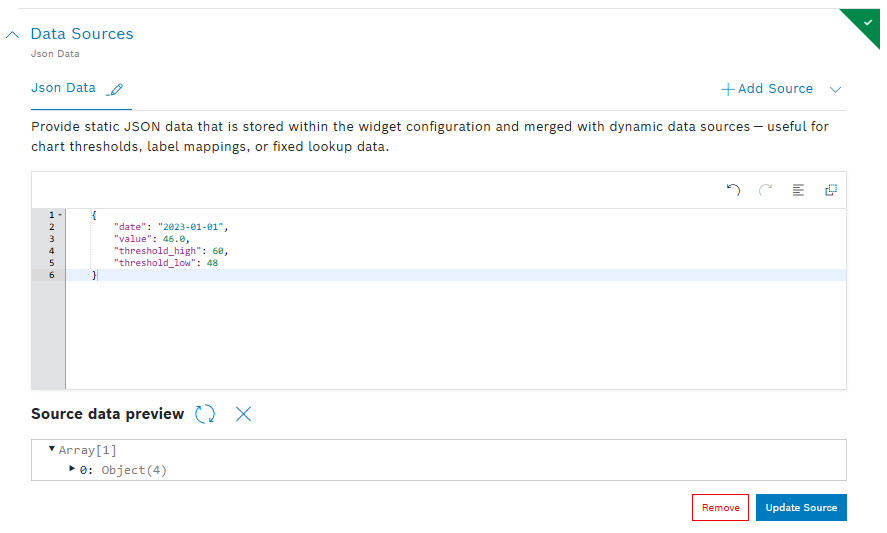
The new option is not available for widgets, like Calendar and Device Details widgets, that support just a fixed dataSource type by design.
For more information about the widgets types, refer to user guide.
July 22, 2026: Table widget | Create valid custom columns with confidence
The Save action for a custom table column remains unavailable until a column name is provided. You are guided toward a complete configuration and cannot accidentally store an unusable column.
To learn more about the widget, refer to Table widget user guide.
July 21, 2026: Query templates | Select the intended template every time
Query template names are now validated for uniqueness. You can distinguish templates reliably and avoid selecting an unintended configuration.
For details about the templates, refer to Query templates user guide.
July 21, 2026: Table widget | Keep filters and inputs synchronized while editing
Table widget filter values and input values now remain synchronized while the widget is edited. Changes made in the edit view are applied consistently to the resulting table configuration.
To learn more about the widget, refer to Table widget user guide.
July 19, 2026: Table widget | Find actions quickly in large tables
Action-button columns in the Table widget can now be included in searches and filters, making actions easier to find in tables with many rows or columns.
To learn more about the widget, refer to Table widget user guide.
July 14, 2026: Bug fixing
- Soft deletion behavior bug | Deletion of processing-references is now fixed
July 13, 2026: External Data Source | Return full response object option introduced
If you need to access the response headers, e.g. for pagination, or the status code in your widget's configuration, you can now enable the new option of Return full response object. We provide the option in the External Data Source view of the Table widget. Since the external data source returns only the body, by selecting this option, instead of the body, we return the complete response object – status, headers, body – in the Source data preview section:
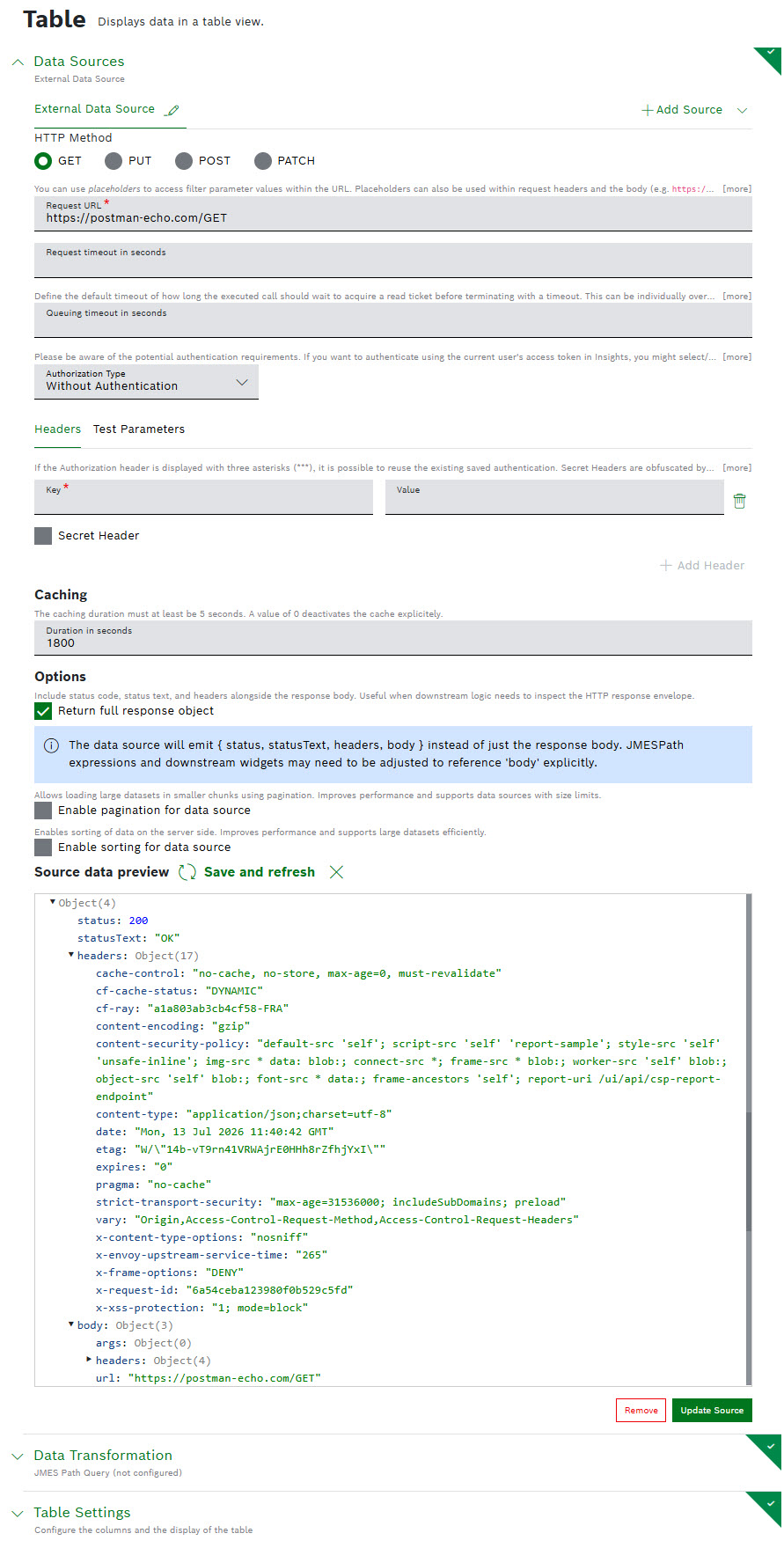
To learn about the rest of the options, refer to the External Data Source section in the Table widget user guide .
July 08, 2026: Event subscriptions | Send authenticated HTTP requests securely
HTTP request actions in event subscriptions can now use configured credentials. You can send authenticated requests without embedding credentials directly in the request definition.
To learn more about event subscriptions, refer to Event Service user guide.
July 08, 2026: Personal Reports | 'Last' option supported in monthly scheduler
As you can find it valuable to generate a report on a last designated weekday, e.g. 'Last Monday of the month', we extended the Report Settings by a Last option. The option is related to the week, when selecting a monthly schedule:
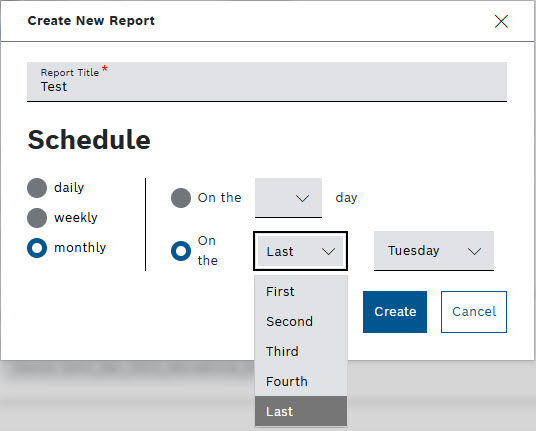
For more general details, refer to Personal Reports user guide.
July 07, 2026: Query template | 'View Version' implemented for all previous versions
If you need to inspect the complete configuration of a past version in a safe read-only state, select the newly introduced View version mode. This mode is available for all versions, but the latest one, providing the context of a previous change or an issue.
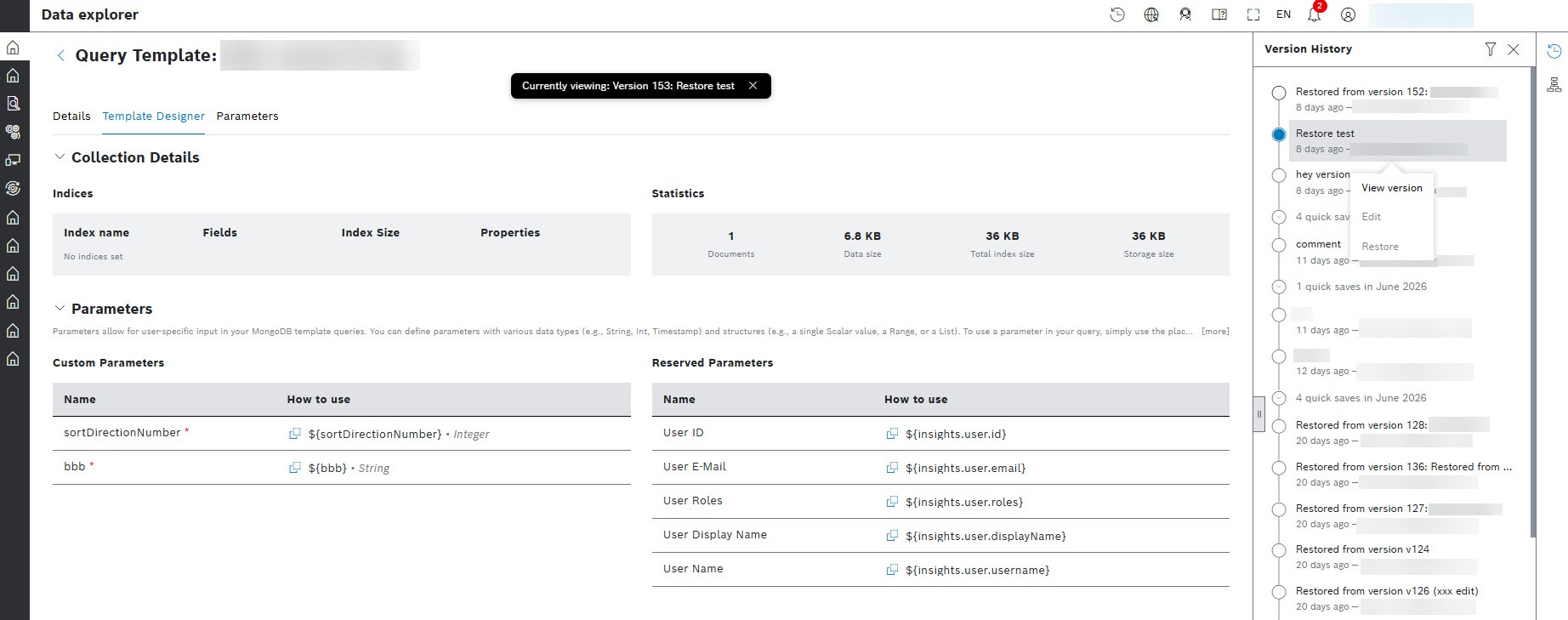
When in viewing mode, the Edit and Restore options are disabled. To exit the viewing mode and return to the latest version, close the notification bar:
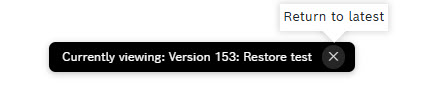
For more information about the versioning system, refer to Versioning query template user guide.
July 06, 2026: Table widget | Placeholders supported in rich text columns
Placeholders are now supported for filterParams, inputFields, and insights references within the rich text column type:
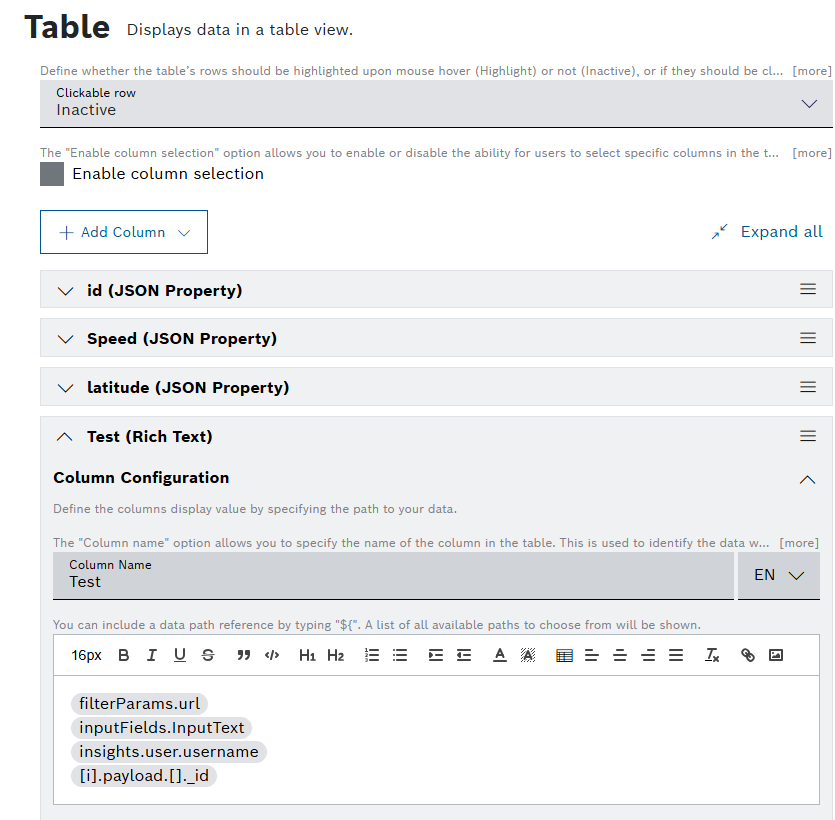
For details about how to configure the Table widget, refer to Configuring the table settings user guide.
July 02, 2026: Personal Reports | Start with a ready-to-use monthly schedule
New Personal Reports now receive a default monthly scheduler during creation. You can adjust the schedule when necessary without having to configure the initial scheduler from an empty state.
Find other details about personal reports in Personal Reports user guide.
July 01, 2026: Action Button widget | Shimmer effect, and display response option added
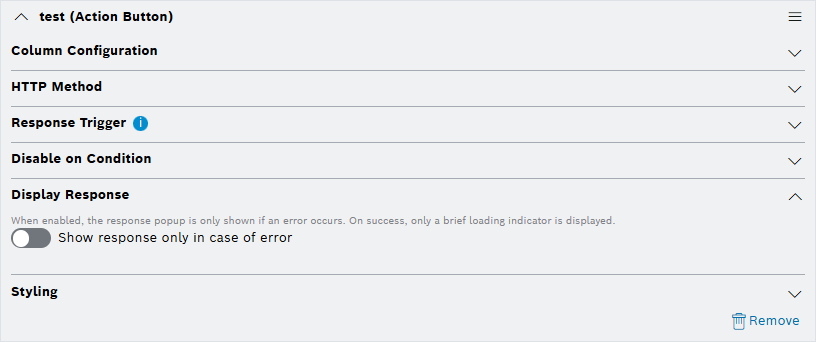
To improve the user experience, we implemented the Shimmer Effect to replace the circling popups in the loading behavior, We also added an option to hide the result on success, and show the response only in case of an error:

The option is also available for table action buttons, and the batch table button, in the corresponding Display Response section:
For more information about configuring the widgets, refer to Action Button and Configuring the table settings user guides.
June
June 30, 2026: Processing pipelines | Know when a pipeline update is required
The application now informs users when their processing pipeline needs to be updated, making required maintenance visible before an affected pipeline is used.
For more information about pipelines, refer to Pipelines user guide.
June 29, 2026: Custom processing steps | Reuse referenced payloads as processing input
Custom processing steps now support `payloadRef` behavior when an input type is configured, allowing you to use the referenced payload as part of the processing input.
Learn more from Configuring a pipeline. Find code examples of your custom step in Pipelines: Configuring the custom step user guide.
June 26, 2026: Upload widget | Upload device attachments larger than 1 GB
The Upload widget now supports streaming for larger device-attachment uploads, including files larger than 1 GB. You can transfer large files without requiring the complete file to be held in memory at once.
For details about the widget, refer to Upload widget user guide.
June 24, 2026: Table widget | Keep dynamic titles correct after navigation
Table widget title placeholders are resolved reliably after navigating between pages and after reloading the page, so dynamic titles remain correct throughout the user session.
To learn more about the widget, refer to Table widget user guide.
June 24, 2026: Query Template | 'Restore' action implemented for previous versions
While viewing the version history, you are now able to revert to a previous state, if your recent changes have introduced a bug or are no longer desired.
The 'Restore' action allows you to create a new version based on the content of an older selected version, maintaining the integrity of the history. To activate the action, select the version you want to restore, and then choose the respective button:
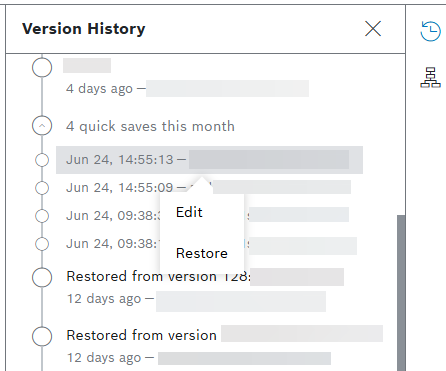
For more information about Query Templates, refer to Versioning query template and Data Explorer user guides.
June 23, 2026: Personal Reports | Schedule reports for the fourth week of the month
Monthly Personal Reports can now be scheduled for the fourth week of a month. This gives you a complete set of weekly scheduling options when you configure recurring reports.
To learn more about personal reports, refer to Personal Reports user guide.
June 23, 2026: Pipelines processing | Option provided to prevent the processing from failing due to non-fatal errors
As not all of the errors are crucial, you can now configure the processing not to fail due to non-fatal errors:
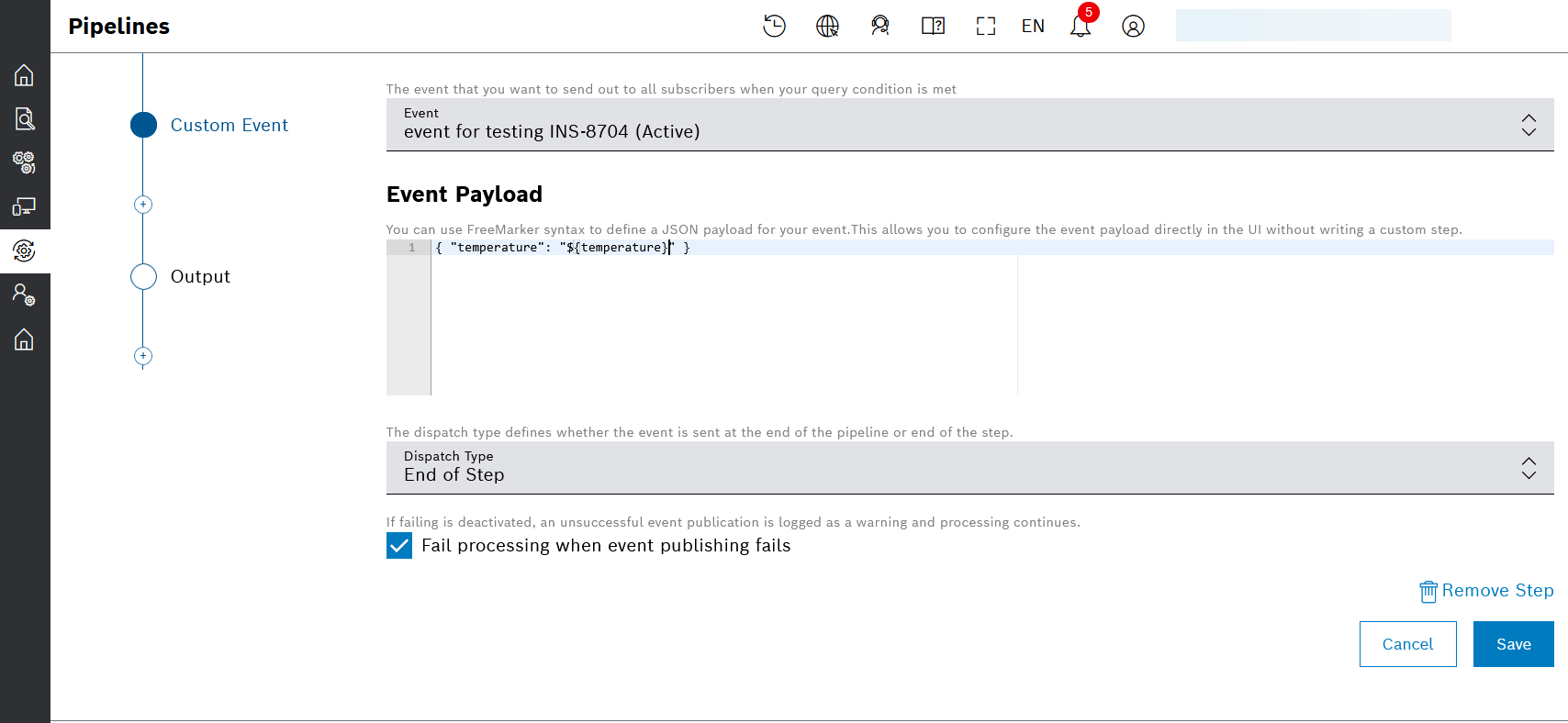
This option you can use on steps of types Custom Event, Device Position, and Custom. Select the status icon to receive more information on the warnings, or failures:
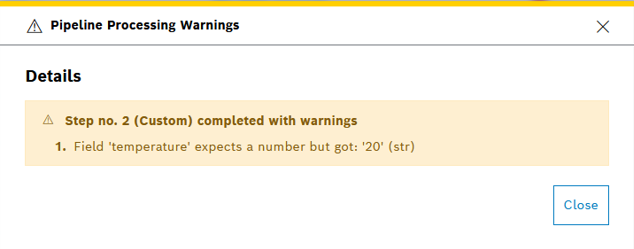
To learn more about pipelines and error handling, refer to Configuring a pipeline user guide.
June 22, 2026: Chart widgets | Z-Axis Label and Trace Rename options added to Heatmap Chart
To give you full control over the chart's labeling, two key labeling features are being added to the heatmap chart:
- Z-axis Label (color scale) to enable explaining what the colors represent with a proper title:
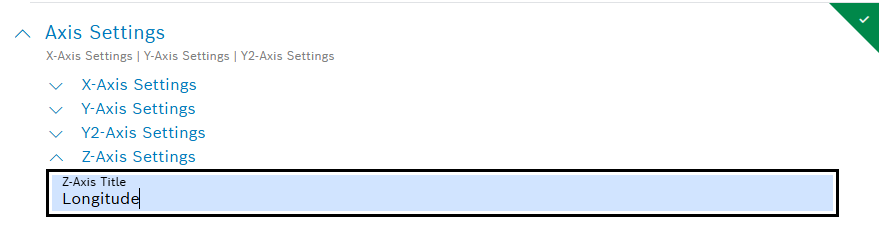
- Trace Rename to enable renaming of the data trace:
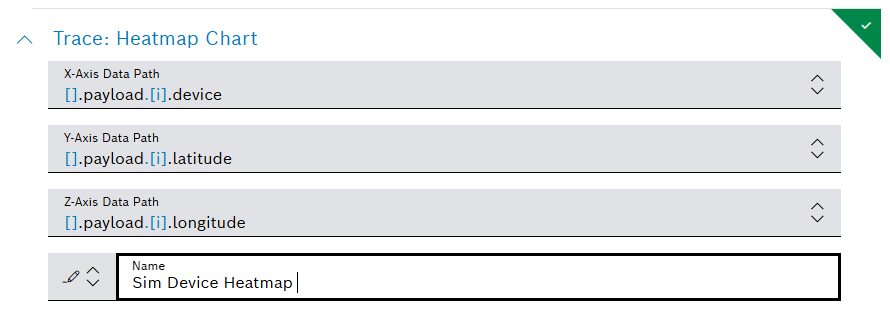
After saving, the chart is presented accordingly: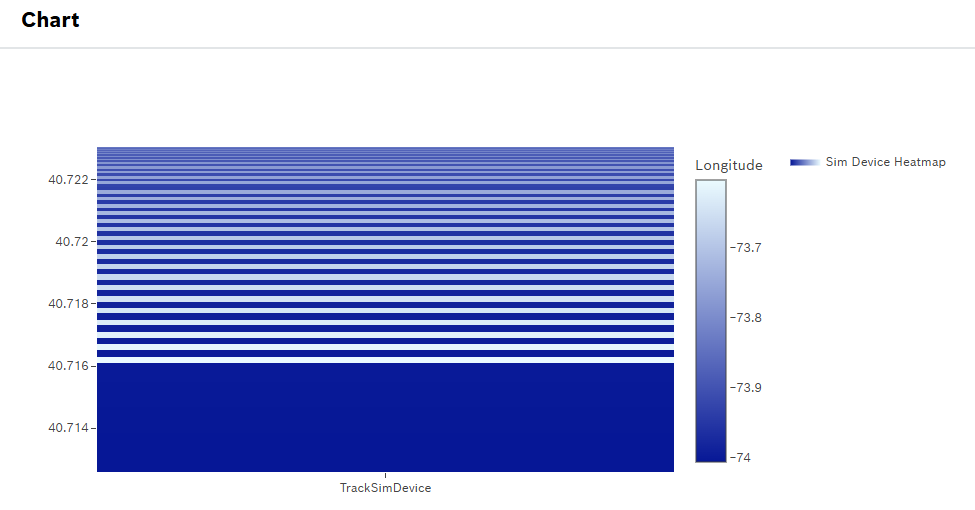
For more general information, refer to Heatmap Chart user guide.
June 22, 2026: External data sources | Use cached responses reliably
Cached responses from external data sources are now parsed correctly. You can continue to use caching for faster dashboard loading without occasionally receiving an undefined result.
June 19, 2026: Calendar widget | Add custom information to bookings
Bookings can now include custom properties, such as free-text values and selectable options. You can capture additional information that is specific to your booking process directly in the Calendar widget.
To learn more about the widget, refer to Calendar widget user guide.
June 16, 2026: Processing Information | Warnings enabled, including on failure reason
We made the failure icon in the processing information dashboard clickable to display error details in a pop-up window, including warnings:
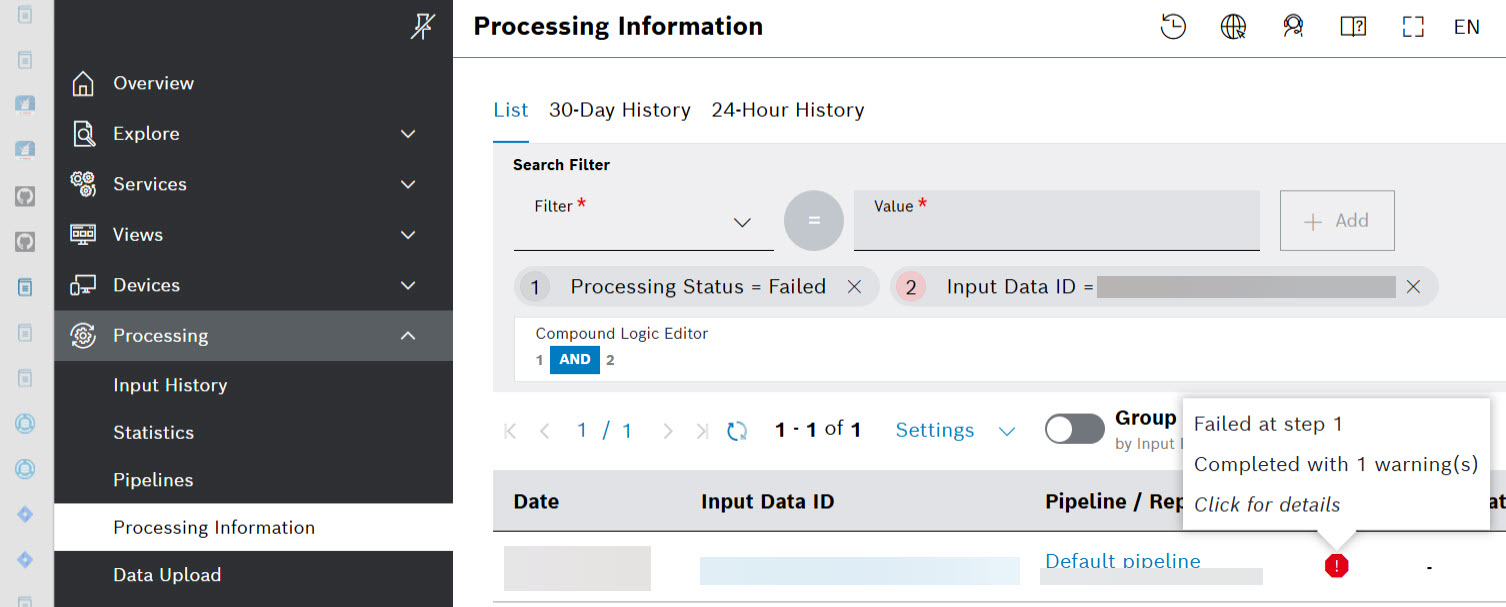
If one or more steps were finished with warnings, their step execution info contains a list with warnings, too.
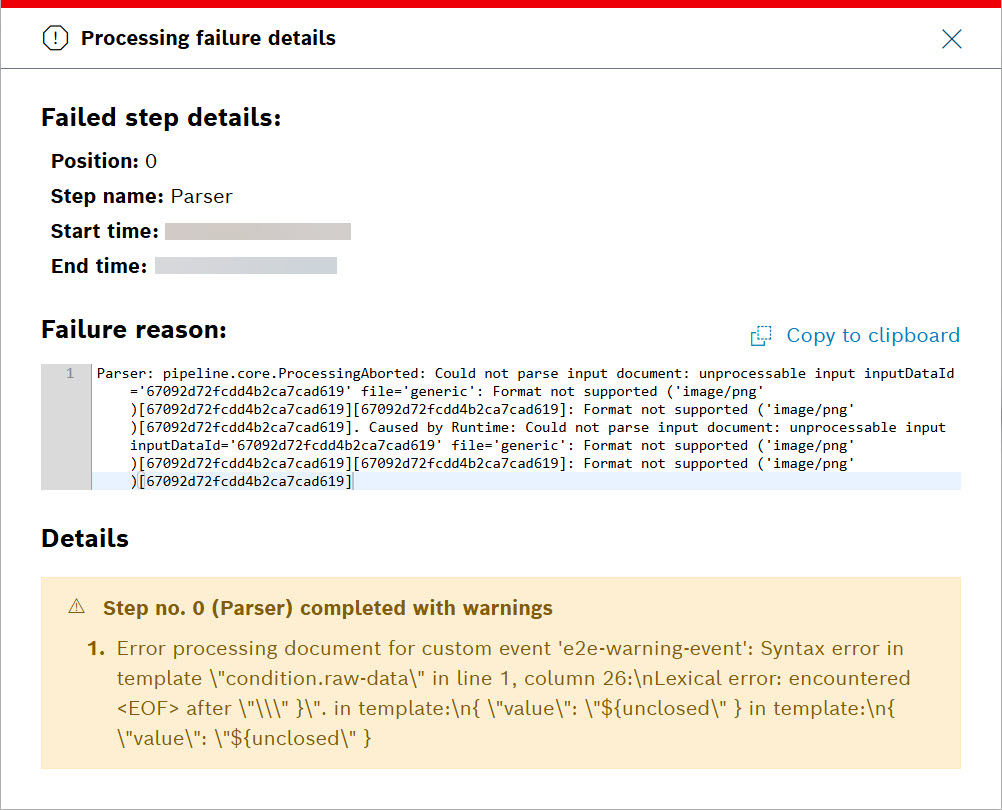
If the status of a processing is "successful with warnings", a clickable yellow triangle icon in the Status column is displayed:

When you select the icon, more details are provided:
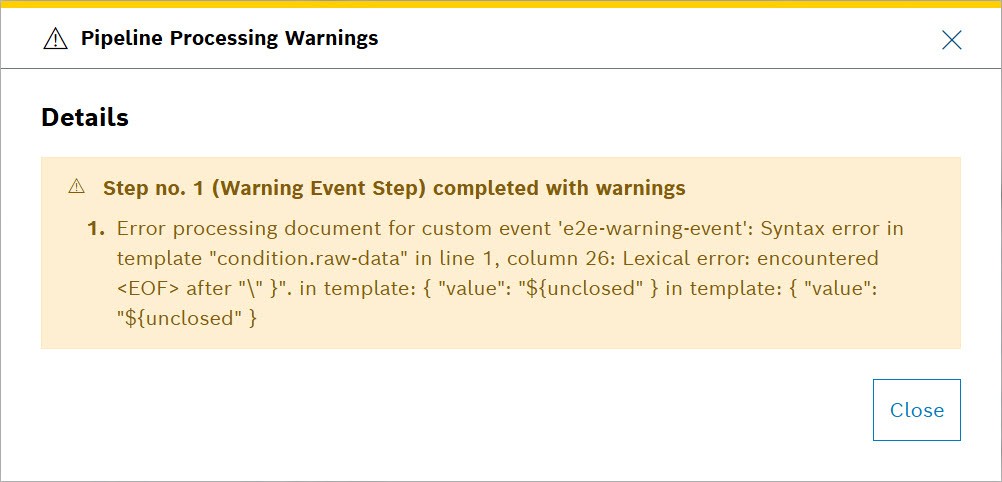
For more information about General functions and more, refer to Processing Information user guide.
June 15, 2026: Query templates | Versioning system implemented
Version History drop down is accessible by selecting the history  icon from the fixed action column from the right hand side:
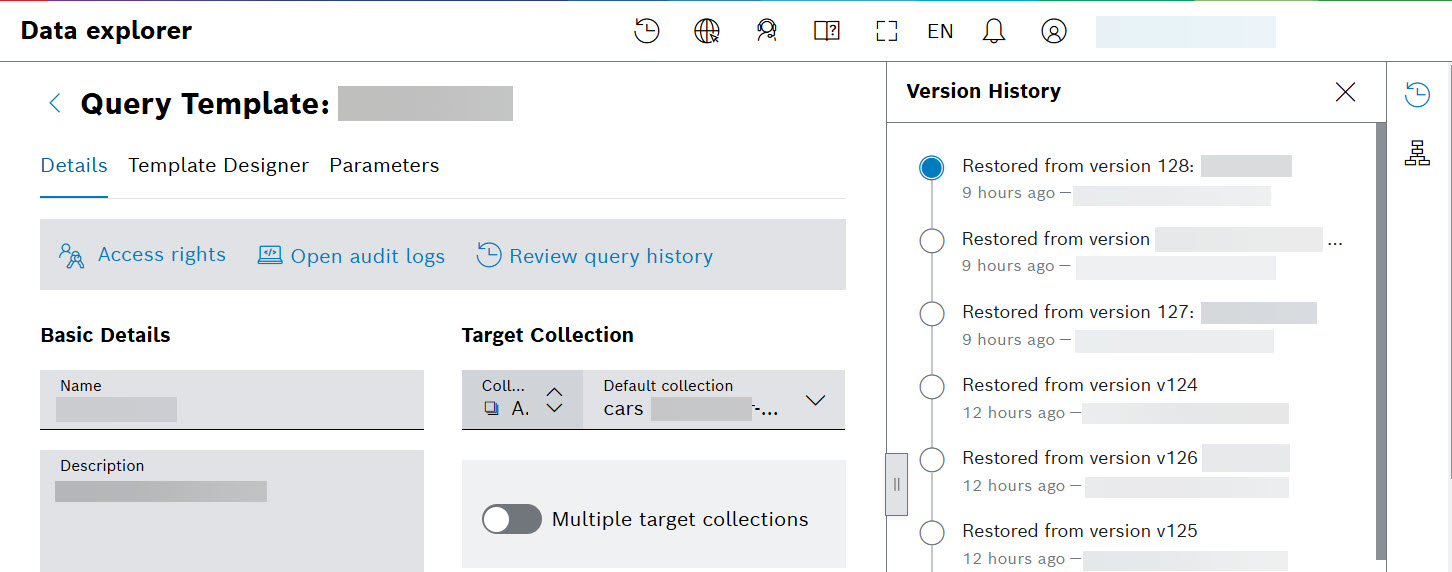
Versions are created by selecting the Save with comment button resulting in 'formal' versions, or the Save button for 'quick save' versions between the formal ones:
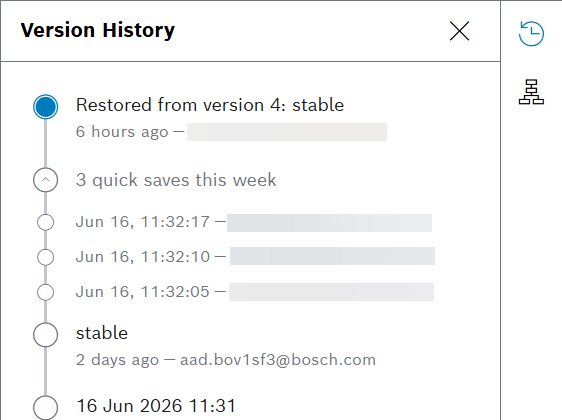
To improve the accuracy and richness of the version history, we introduced the ability to edit the comment and tags of a past version. This is the first interactive feature added to the version history dropdown menu. You can edit the version by selecting it. Then, an Edit button appears:
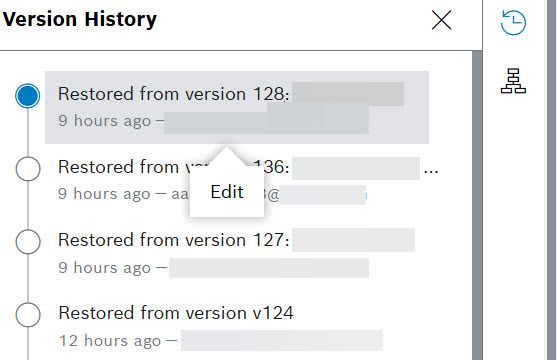
Select the Edit button and change the version comments and tags: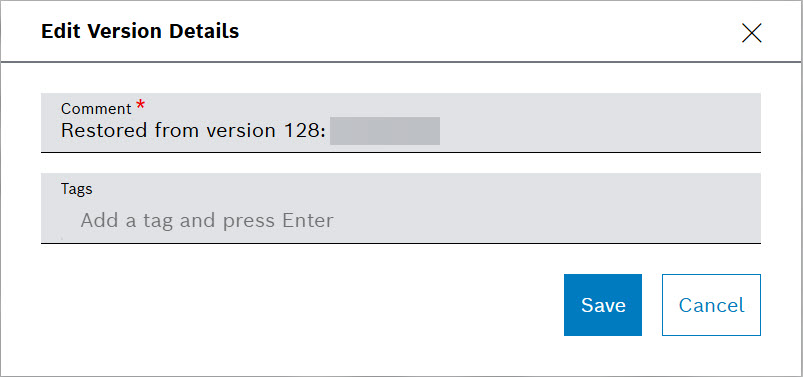
For more information about Query Templates, refer to Versioning query template and Data Explorer user guides.
June 15, 2026: REST data sources | Use a data source immediately after creating it
Newly created REST data sources are available reliably when they are used straight away in a filter widget. You no longer have to wait or retry because the saved data source was temporarily reported as missing.
June 15, 2026: Table widget | Switch dashboards without leaving unusable filter popovers
Column filter popovers now close correctly when you navigate to another dashboard. The new dashboard is no longer covered by an unresponsive popover, and a browser refresh is not required to clear it.
To learn more about the widget, refer to Table widget user guide.
June 08, 2026: Processing information | See the actual status of processed data
Processing information now reflects the current state of input and processed data more accurately. You can distinguish available results from deleted data and understand the status shown for a processing run.
For details about processing information, refer to Processing Information user guide.
June 08, 2026: Input widget | Use relative time ranges without reloading the dashboard
Relative time ranges can be defined and used reliably in the Input widget. Presets such as the previous two weeks are initialized correctly, and you can switch between relative and absolute ranges without reloading the dashboard.
For details about the widget, refer to Input widget user guide.
June 07, 2026: Reports | Download processed data as a PDF report
PDF report capabilities are available for presenting processed and aggregated data in a downloadable format. You can create a report that is easier to share, print, or keep as a record.
June 07, 2026: Signals widget | Select all signals with one action
The Signals widget now provides a Select all action. You can quickly select every signal for an overview instead of choosing signals one by one.
To learn about the widget, refer to Signals Chart widget user guide.
June 07, 2026: File upload | See why an upload failed
Upload failures now display the error information provided by the backend. You receive useful feedback for connection, file-size, and other upload problems instead of having to diagnose an unsuccessful upload without an explanation.
For details about file upload, refer to Data Upload user guide.
June 07, 2026: Device filters | Save and share filtered device views as links
Device filter selections are now represented in the page URL. You can bookmark frequently used views or share a link that opens the same filtered device list.
June 06, 2026: Data Browser and Simple Search | Find values containing a term
The Contains operator is now available in the Data Browser and Simple Search component. You can find records whose values include a search term without needing to enter the complete value.
For details about Data Browser, refer to Data Browser user guide.
June 04, 2026: Table widgets | Placeholders supported in Batch Processing
Batch Action Button and Batch Action Hyperlinks now support placeholders for Name and Tooltip:
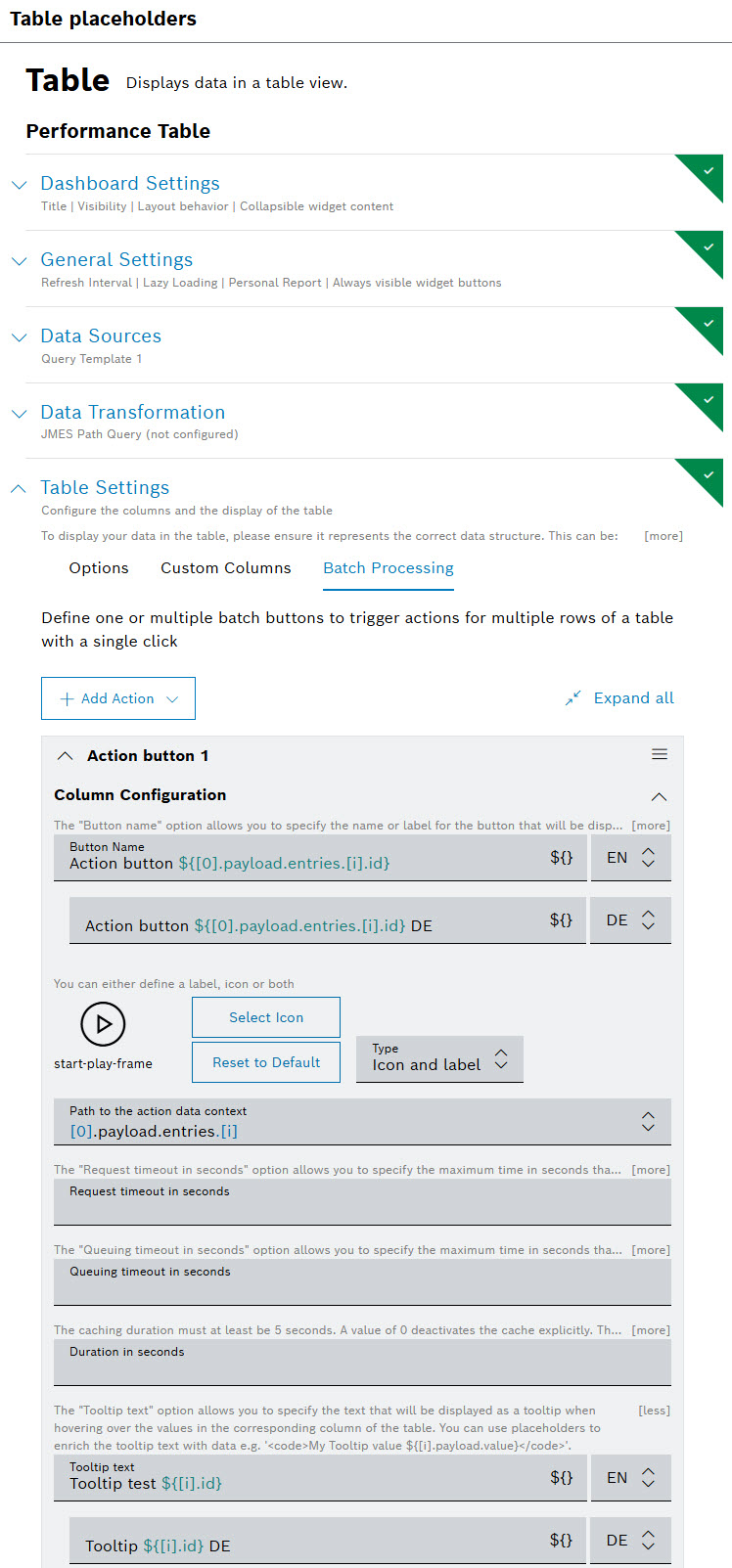
Now, you are supported with a drop-down list with all the available placeholders you can use:
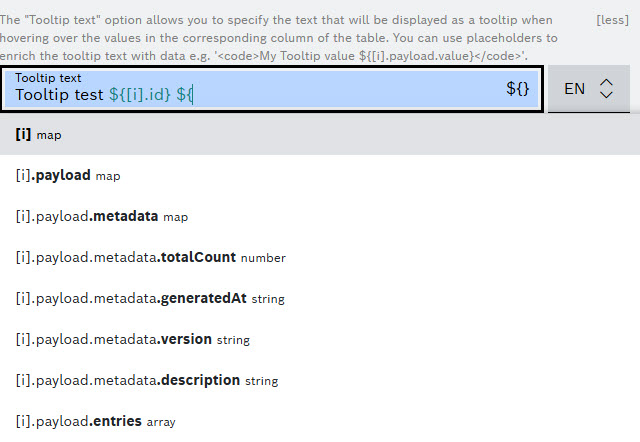
To learn more about Batch Processing, refer to Configuring the table settings user guide.
June 01, 2026: Personal Reports | Configuration interface improved to allow adding, editing, or removing filters
When you configure a report, you are now able to modify the filter criteria directly within the configuration dialog – the configuration interface provides you the functionality to add, edit or remove filter parameters:
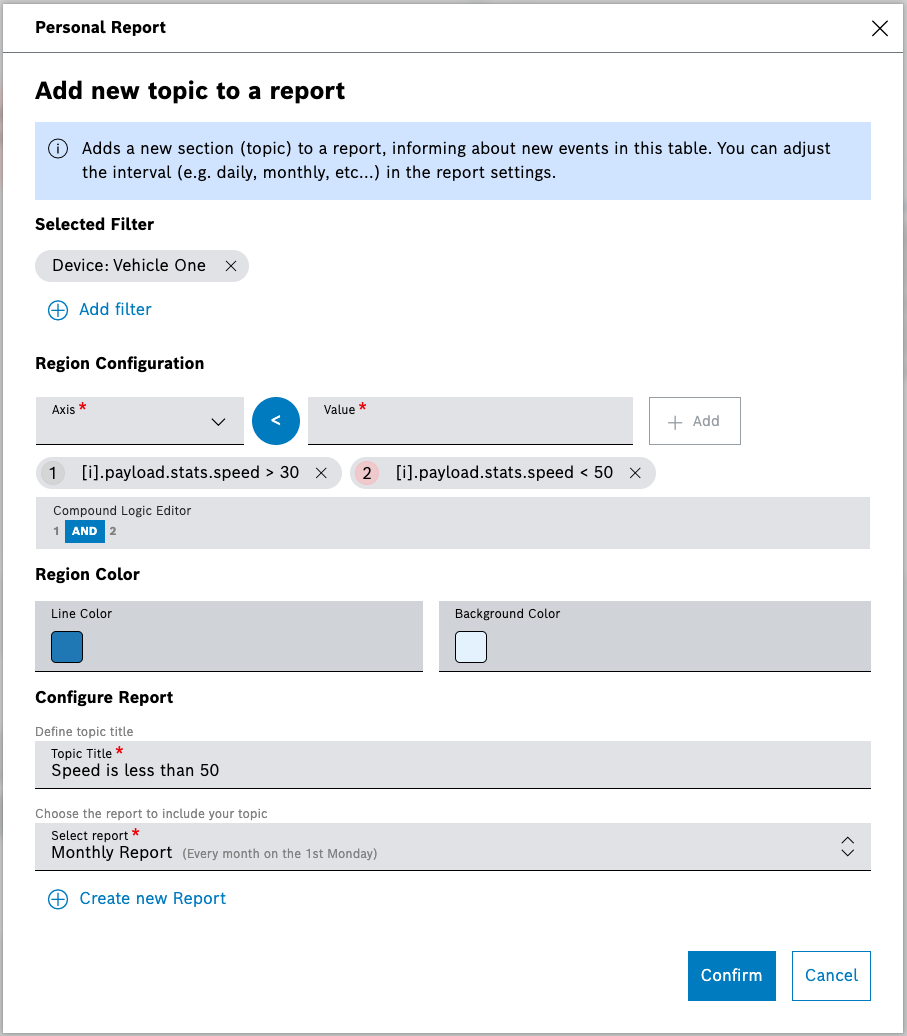
For more information, refer to Personal Reports user guide.
May
May 28, 2026: Pipelines | Multi Output step added
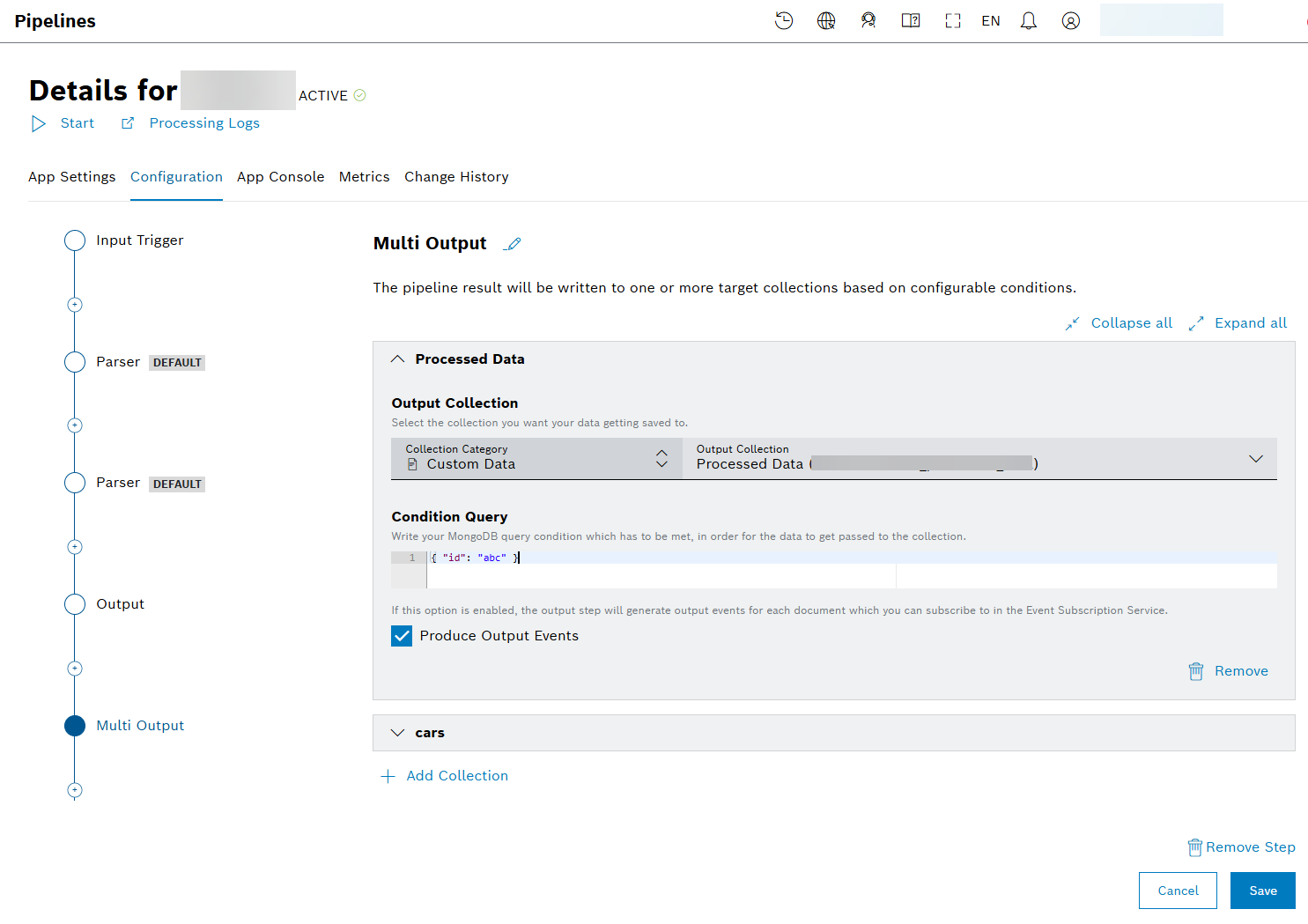
A new Multi Output step is provided to allow the pipeline result to be written to one or more target collections based on configurable conditions: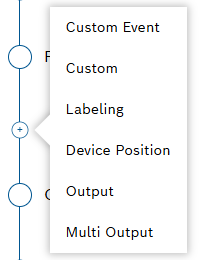
You can add collections by selecting the + Add Collection button and then choosing one from the drop down list of the Output Collections field. In Condition Query field, you can provide your MongoDB query condition which has to be met so that the data get passed to the specific collection.
For more details, refer to Configuring the Multi Output section from the Configuring a pipeline user guide.
May 27, 2026: Pipelines | New Processing Finished Event introduced
A new system event type pipeline processing finished has been introduced for the processing pipeline.
The event publishing can be activated on the pipeline's trigger configuration:
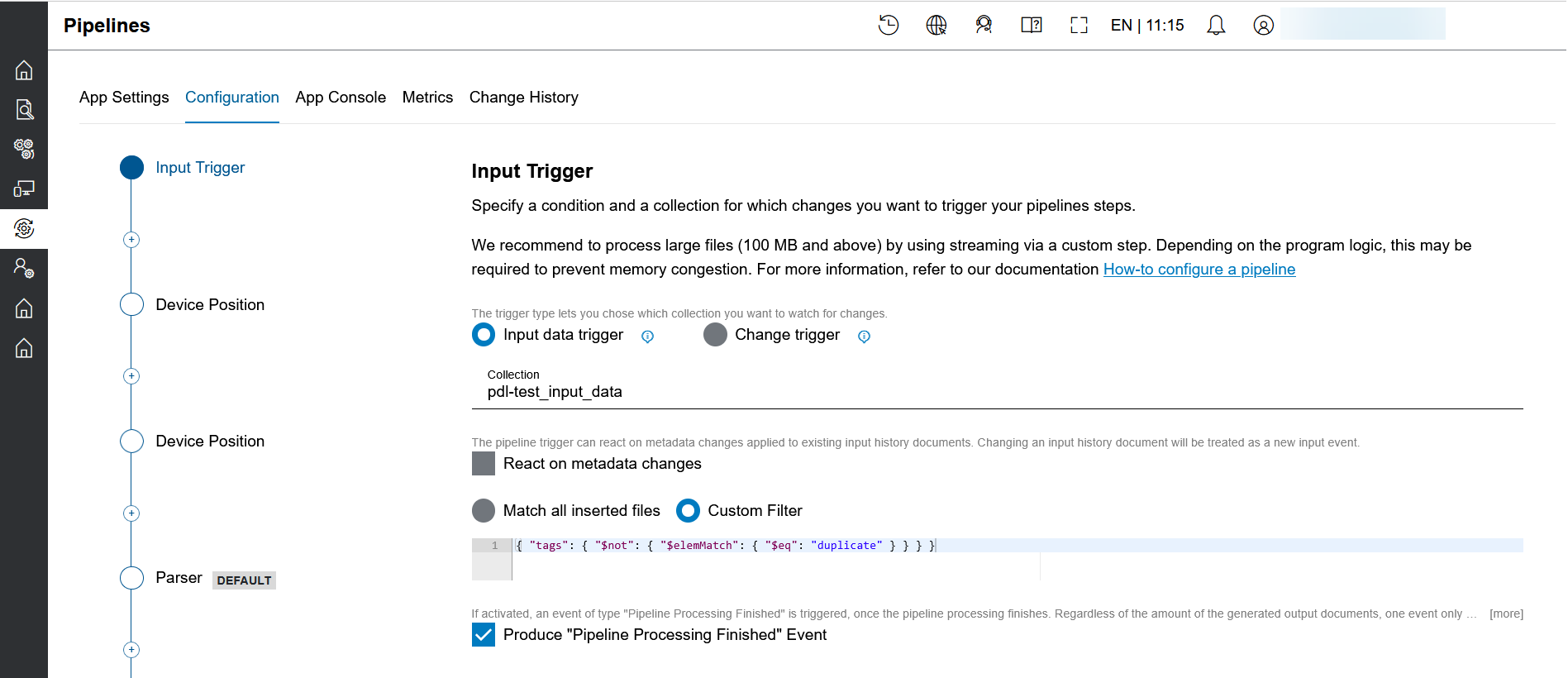
Once enabled, a pipeline processing finished system event is published exactly once after each pipeline run completes, regardless of whether the run succeeded or failed, and regardless of how many output documents were produced. The event is also fired for reprocessing runs.
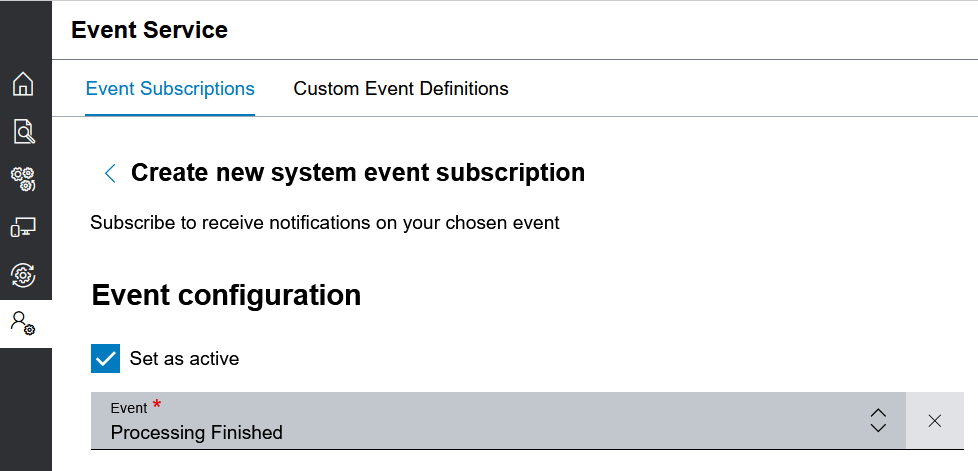
As for each system event type, subscriptions can be created. Select 'Processing Finished' from the list of available system events:
For more information about pipelines and Event Service, refer to Pipelines and Event Service how-to guides.
May 22, 2026: Third party libraries | SBOM file provided for customers
As all products and solutions need to provide the Software Bill of Materials (SBOM) of their used third party component libraries, we export the SBOM in the CycloneDX format.
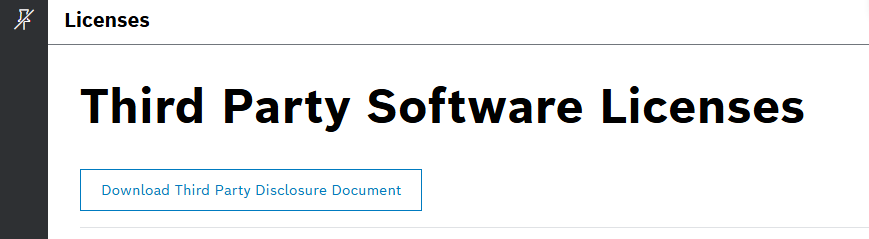
On the Licenses page, select the Download Third Party Disclosure Document button to access the SBOM and explore it:
May 21, 2026: MDF parser | Invalidation bit handling improved
The invalidation bit is now at all places of your mf4 data recognized and respected as default behavior of the Bosch IoT Insights MDF Parser. The unintended set of invalidation bit leads to null data of the respective values. As you can normally decide in other tools if the bit is considered or ignored, you can as well change the behavior of the Bosch IoT Insights MDF Parser by setting the environment variable MDF_IGNORE_INVALIDATION_BIT = true. This leads to decoding decodable data points, and still ignoring technical not decodable values.
To check the available environment variables to control and influence the behavior of the MDF parser, refer to the ASAM MDF decoder parser step in Configuring a pipeline how to guide.
May 20, 2026: Freemarker | Version updated to 2.3.34
The provided Freemarker, which is used in e.g. query templates, is updated to 2.3.34 version.
May 19, 2026: Bosch IoT Insights parsers | Newly introduced A2L decoder parser
As newest of Bosch IoT Insights parsers, we introduced an ASAM MCD-2 MC (A2L) compatible parser. This parser expects that the .A2L specification file and the related .hex files are uploaded as one zip file to a Bosch IoT Insights Project. If needed, the usually relative huge result data gets written in multiple documents. It is recommended to use at least 4GB for pipelines using this parser.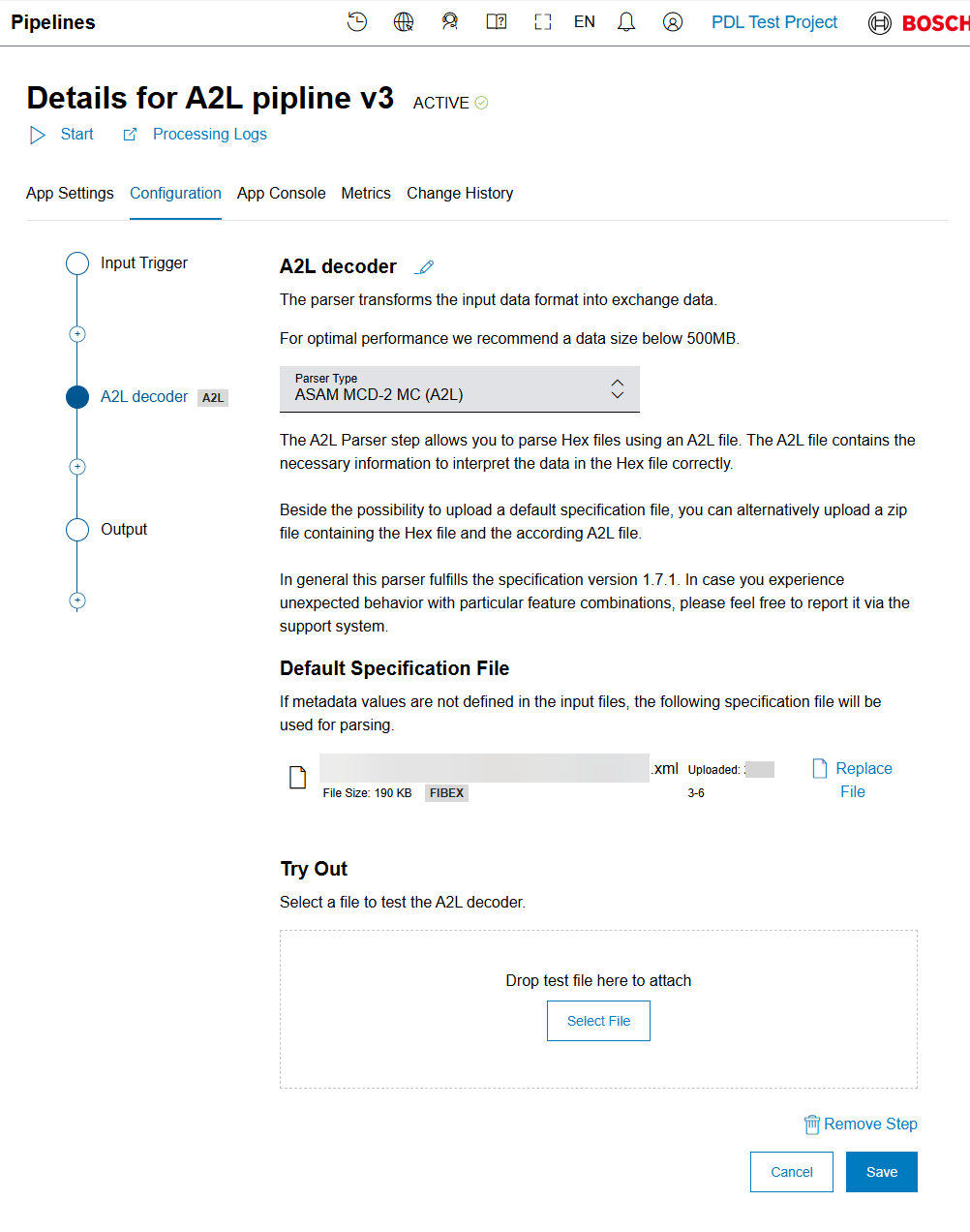
For more information about how use the A2L decoder in a pipeline, refer to ASAM MCD-2 MC decoder parser step in Configuring a pipeline user guide.
May 18, 2026: Query Template | Query Template editor restructured into Tabs
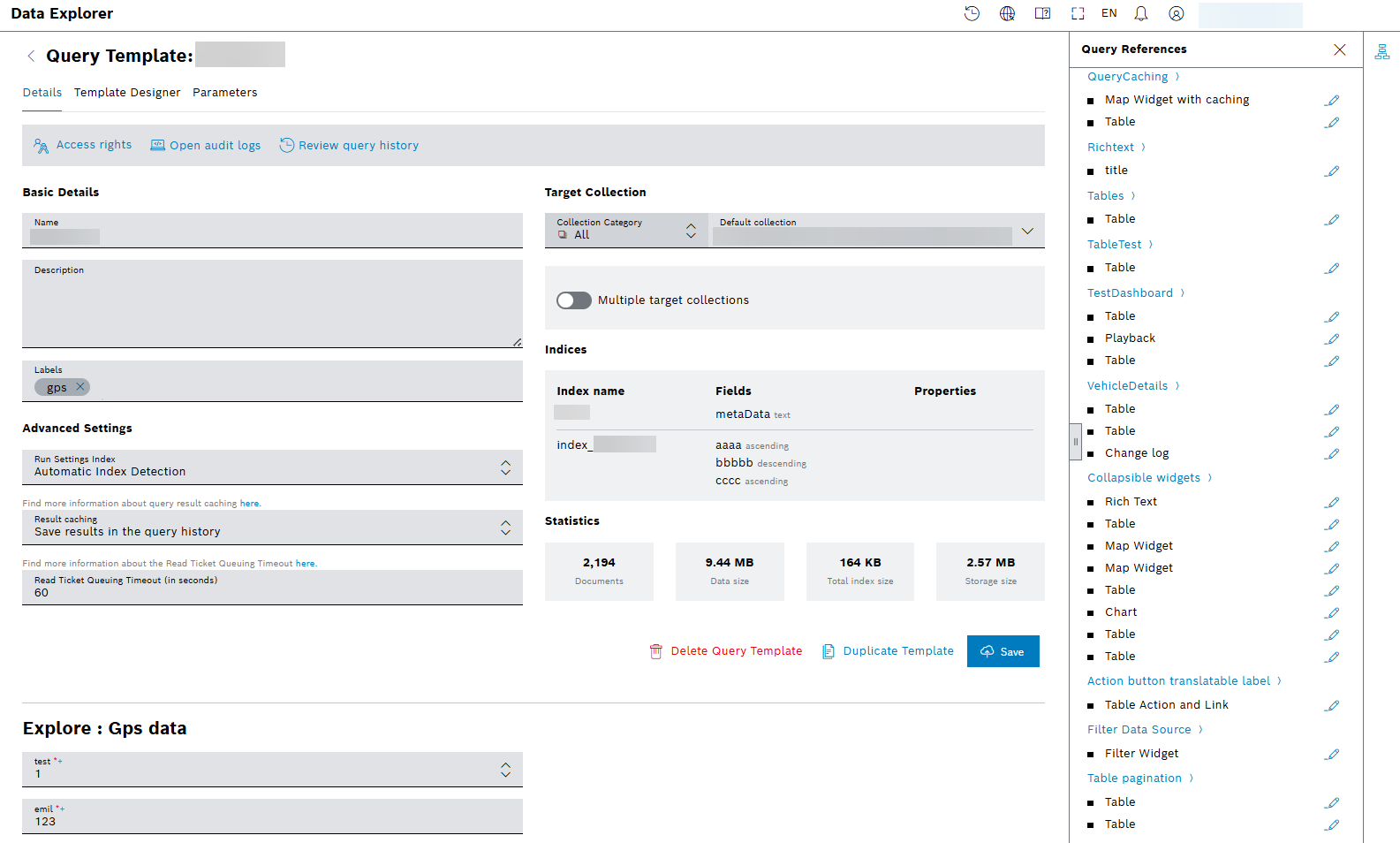
To improve usability and create a more organized workspace, the editor is restructured into a logical, tab-based interface, namely Details, Template Designer, and Parameters tabs. This separates distinct areas of configuration, making the tool cleaner and more intuitive to use.
You can now easily explore the query history with the provided button of  Review query history. From the sidebar on the right, select the newly added icon
  to enlist and edit the query references:
Also, more descriptions are provided to Parameters tab, increasing the user experience:
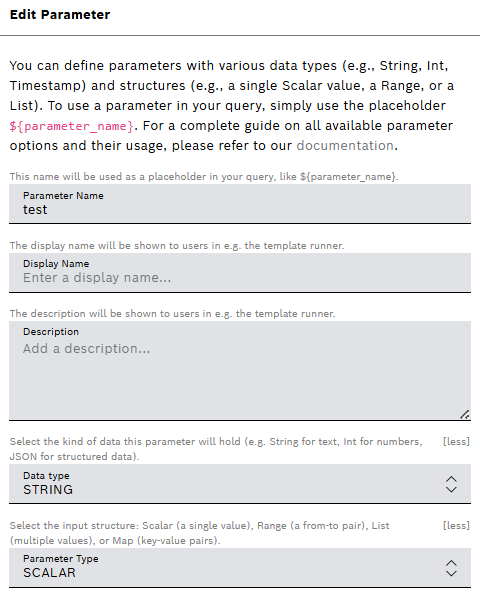
For more information about query template, refer to Creating a query template user guide, which includes Viewing the query references guide.
May 15, 2026: Faceted Search | Facet’s technical name linked to a query parameter from the query template
A dropdown has been added to the facet configuration, listing all available facet query parameters from the query template. You can select a parameter from the list to explicitly link the facet to that query parameter. As a result, you can avoid hidden mismatches and make the configuration easier to understand and debug.
The following example shows the Facet search field checkbox selected for using the facet search counts from the connected facet data source for this filter field. The new Facet query parameter field with its dropdown list is displayed with its default value – the value of the Technical Name field above.
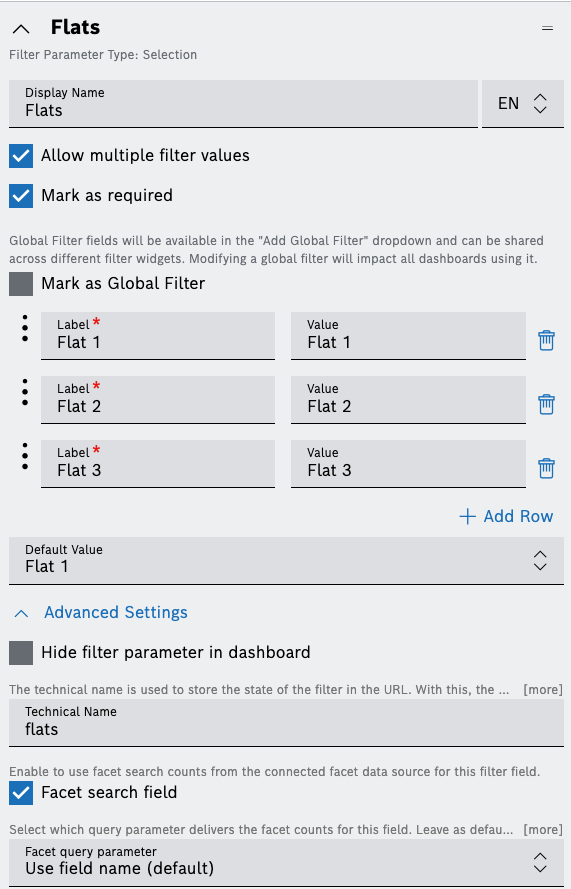
For more details, refer to Configuring the faceted search tutorial.
May 05, 2026: Event actions | Array is allowed in the request body
In the event actions, you can now also add a rest request with a 'raw data' body that contains an array at the top level instead of an object.
Learn how to subscribe for events and to configure the respective action(s) which will be triggered when such an event is received from Event Service user guide. Find an example of a configured HTTP-request action there, too.
May 04, 2026: Data Browser | 'Go to last' and 'Number of filtered pages' options enabled
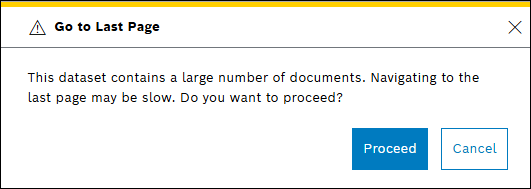
The 'Go to last' option allows you to access the most recent data without having to scroll through all previous entries. If the number of documents is more than 10 000, a warning message appears:
If you have applied a filter to your collection, you can now see the number of pages from the search result by the selecting infinity sign as shown below.
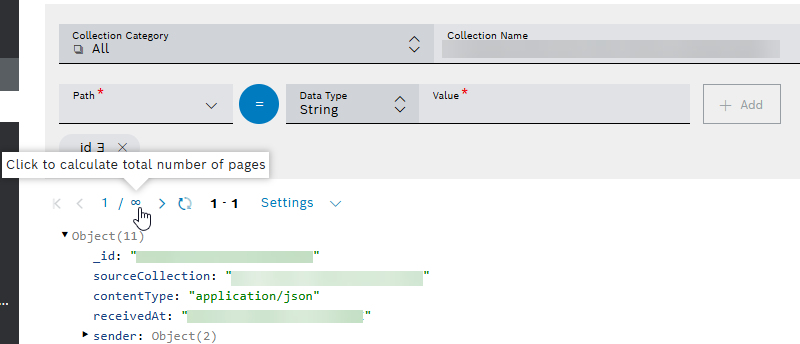
Then, that number will be calculated and displayed instead of the infinity sign.
For more general information, refer to Data Browser user guide.
April
April 21, 2026: Personal reports | Reports improved with item count, time range, frequency indicator, and confirmation
The following improvements increase the user experience of our Personal reports feature:
Item count and time range displayed
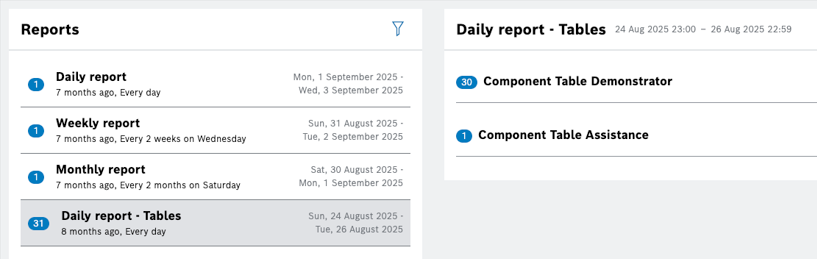
Now, instead of the number of topics, the item count displays the number of the summarized entries of all topics included in a report, as in the selected Daily report - Tables from the screen shot above.
The time range relates to the period of time when the notification is received.
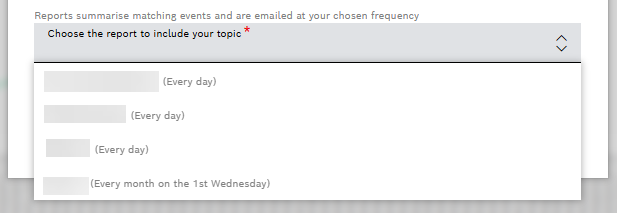
Report selection enhanced with frequency indicator
Confirmation of successful topic creation added
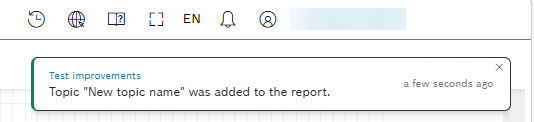
To learn how to create and enable personal reports on project and widgets levels, how to create a report topic and view the generated reports, refer to Personal Reports user guide.
April 20, 2026: Pipeline system updates | Pipelines restarted in a maintenance window only
A new maintenance window has been introduced for system updates of the processing pipeline that are caused by the release of new pipeline image versions.
Processing pipelines are regularly updated by the Bosch IoT Insights team. When such an update happens, the pipelines are usually restarted. These restarts are sensible because they interrupt the continued processing of data for a short period of time.
To avoid restarts during business hours, the pipelines will delay their restart to Tuesdays at 4 AM UTC. A message will be shown in the pipeline list when the pipelines are going to be restarted automatically.
You can always choose to restart your pipeline manually before the date, which will make the automated restart obsolete.
For details about the pipeline components, processing architecture, system updates, and general functions, refer to Pipelines guide.
April 15, 2026: Trial plan creation | Booking possible directly on the Homepage
Clicking the Try now button on the homepage now opens a new panel for Trial plan creation. After entering a project label, the plan can be created automatically. The Try now button is only visible if you have not already created a trial.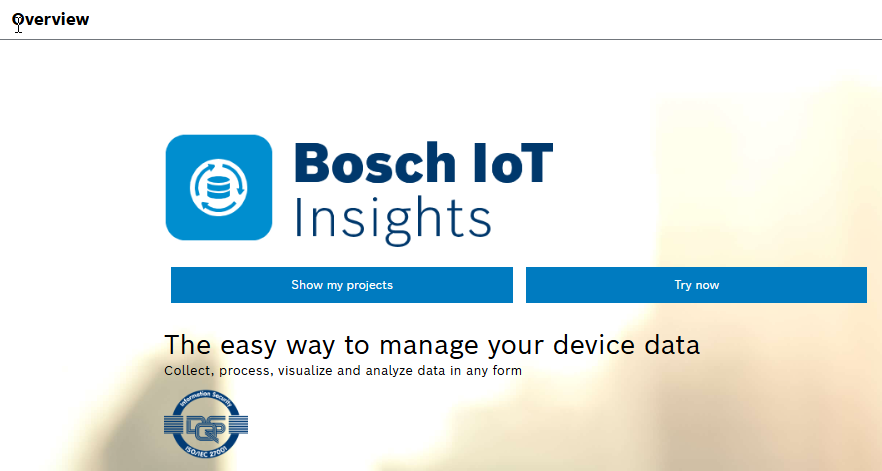
April 14, 2026: MongoDB query service | Result streaming failure is now reported
When a parse error happens, the actual error from the Query History is fetched, and the UI shows an error from the Query History instead of just showing INTERRUPTED state without an error message.
To learn more about Download query results, MongoDB extended JSON, and Query templates, refer to MongoDB Query Service.
April 10, 2026: Python 3.13 support | Deprecated Python 3.9 removed from processing pipeline image version
After all customers have moved to the latest processing pipeline image version with Python 3.13, we have removed the old processing pipeline image version that contained Python 3.9.
April 09, 2026: API improvement | Partial and resumable downloads supported for input data
The input data download endpoint now supports HTTP Range requests, enabling partial and resumable downloads for large files without requiring a full file transfer.
The following capabilities are available:
GET /v1/{project}/input-data/collections/{collectionName}/documents/{inputDataId}/download– Supports Range and If-Range headers and returns 206 Partial Content for ranged requestsHEAD /v1/{project}/input-data/collections/{collectionName}/documents/{inputDataId}/download– Returns Content-Length and Accept-Ranges: bytes headers for metadata retrieval
March
March 25, 2026: Upcoming API Changes | Legacy Endpoints phased out
To improve API efficiency, we are planning to remove the following outdated REST endpoints as enlisted in the Announcement.
If your current integrations use any of these endpoints, please check our Project Management Service API for alternative solutions at API Docs.
For support, contact us at Bosch IoT Insights Help Center – IoT Insights Support – we will be happy to assist you with the transition.
Thank you for your cooperation!
March 19, 2026: API improvement | Resumable-Upload PUT endpoint ensured to work from a browser
The resumable-upload feature is improved to work not only when used from a REST client, but from a browser, too.
Creating a resumable upload requires authentication, while the following upload operations are publicly accessible – secured via uploadId – and support Cross-Origin Resource Sharing (CORS) for cross-origin use:
- HEAD /v2/{project}/resumable/upload/{uploadId} – Get resumable upload status
- PUT /v2/{project}/resumable/upload/{uploadId} – Upload complete data for non-resumable upload
- PATCH /v2/{project}/resumable/upload/{uploadId} – Upload chunk for resumable upload
March 18, 2026: API feature | REST API provided to delete custom widgets
There was no option to delete a widget that was deployed from the main branch. Now, if you want to discontinue a widget, a REST API exists to delete it:
- DELETE /customwidgets/{project}/{branchName} – Delete custom widgets
Out of scope
Please note that the widget to be deleted might have already been used in some dashboards. The handling of this case is currently not part of the feature.
March 17, 2026: Collections | Access rights management added to Master Data type
Now, you can now control the access to collections of type MASTER_DATA.
In the Details view, a new Access Rights section and an edit button provide the options of Read or Read & Write access rights for the roles.
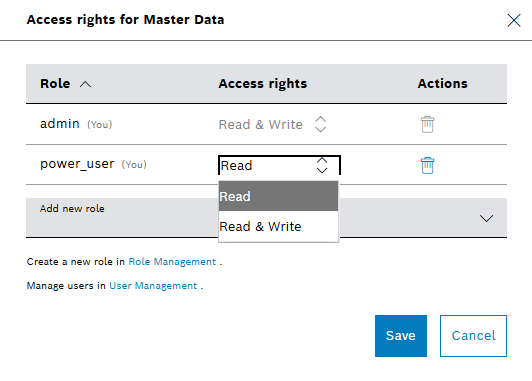
Access rights assignments are also available when creating a new master data collection:
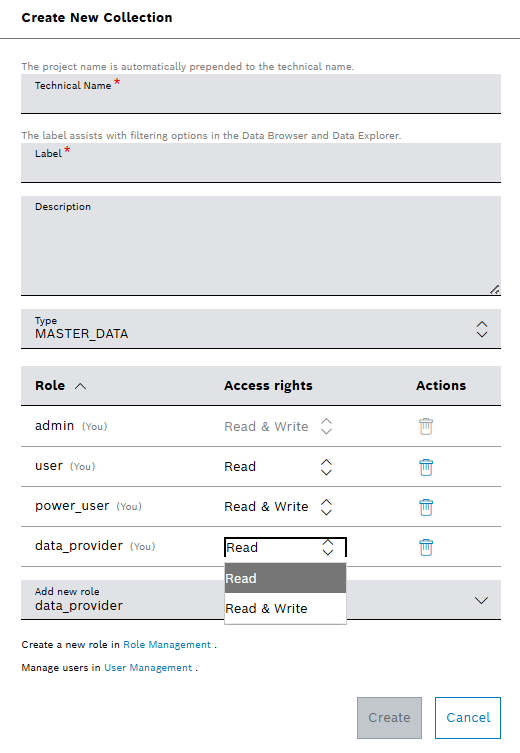
For more details about Collections, refer to Collections user guide.
March 16, 2026: Processing information | Reprocessing supported for current data
A new trigger button Group displays the latest status per input data and pipeline:
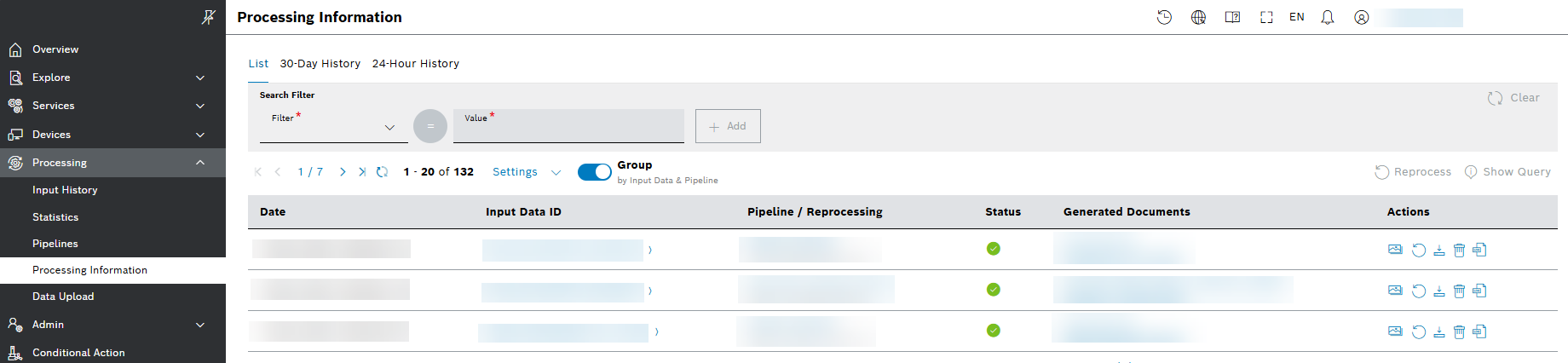
Two reprocess buttons are now available:
- To reprocess all documents, select the new button
 Reprocess from the upper-right side above the table.
 - To reprocess just the current document, select the button from the Actions column.
A Reprocessing dialog box appears with preset pipeline and filter:
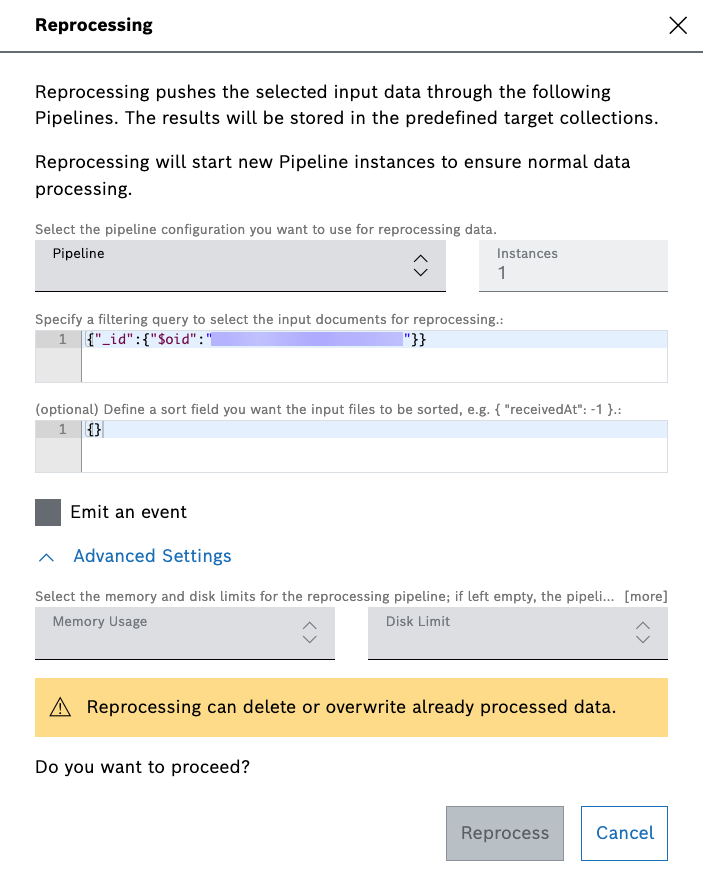
When the number of documents exceeds 1000, reprocessing is disabled with a hint that there are more than 1000 input data entries.
Reprocessing is not possible eighter if more than one pipelines are involved. Then the respective buttons are not active.
For more general information, refer to Processing Information user guide.
March 13, 2026: Table widget | Autocomplete supported for placeholders
To improve the user experience, the Table widget now supports autocomplete for all the fields with placeholders, and for the modifiers within the placeholders.
Typing ${ in a field that supports placeholders – marked with ${} at the end of the field – displays the list of options to choose from:
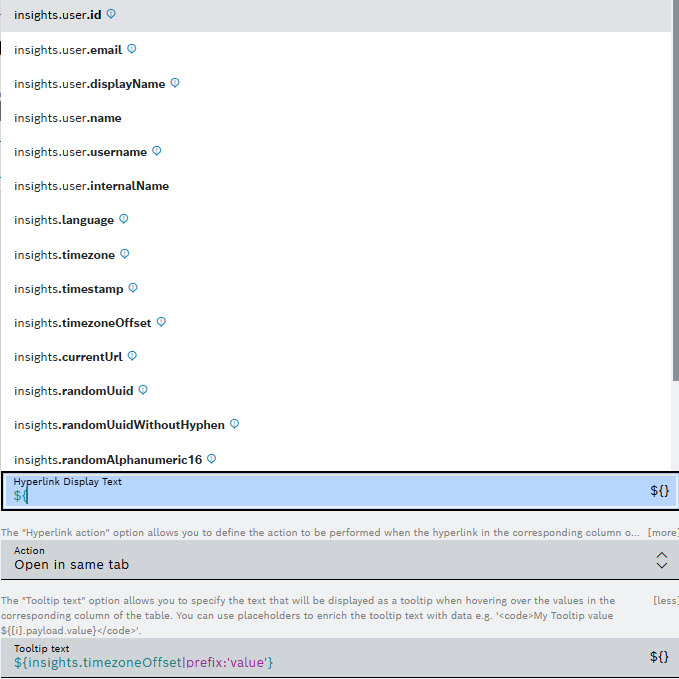
Autocomplete is also supported for modifiers. You can activate a modifier via the vertical bar | inside the placeholder.
Find more information about how to configure a Table widget in Configuring the table settings user guide.
March 12, 2026: Dashboards | Grid layout improved
Grid dashboards have been improved with better layout and arrangement, including a responsive (mobile-friendly) layout and gridlines during re-layout.
To learn how to select free-floating grid or compact grid views of a dashboard, refer to Dashboards user guide.
For more details about how to easily change the size and the position of widgets on your dashboards, refer to Arranging widgets in the grid-based layout.
March 11, 2026: Free plans | Action Button and Upload widgets enabled
The Action Button and Upload widgets are now enabled for free plans, too. They can be used in free plans to send request towards the Bosch IoT Insights REST API. But free plans are prohibited to send REST requests to external services.
For details about these functionalities, refer to Action Button and Upload widget user guides.
March 10, 2026: Global filters | General settings applied in different tabs
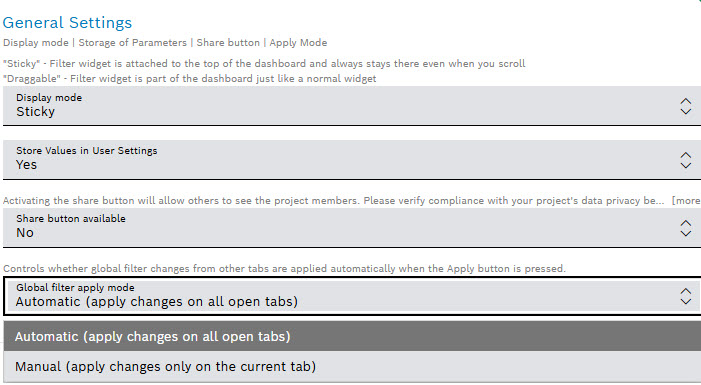
Global filters should not be automatically changed and executed when comparing two settings in e.g., two tabs. Since this behavior is expected by others, an option to enable the changed functionality is introduced.
Now, any changes to global filters are only applied and executed when the Apply button  is pressed. A drop-down menu – Global filter apply mode – allows users with administrative rights (widget configuration rights) to enable or disable the non-automatic filter behavior.
For more information about Filter widget, refer to Filter widget user guide.
March 09, 2026: Processing Pipeline | Performance improved for scaling over 4 instances
Data input to multiple processing pipeline instances needs to be synchronized that the pipeline knows which instance should process one specific input.
If the input frequency is very high and the processing time is very fast, the synchronization overhead increased in the past with the number of instances. E.g. 10 pipeline instances all had to ask whether they can process the same input id. In high frequency cases this could take more time than the processing itself, which negates the effect of scaling instances.
This issue has been solved when the processing pipeline is scaled to 4 or more instances. The watch streams which are opened to the database filter now only for input data which is relevant for the own processing group to avoid synchronization overhead.
Each processing pipeline is now assigned to a processing group which has ideally 2 members. So only 2 instances get to know a single input data. This means when a pipeline is scaled to 10 instances, only 2 will have to ask to process the same input id. For increased reliability each group has 2 to 3 members and not only one.
After this improvement, scaling over 4 or more instances actually increases the throughput for high frequency input processing. This scaling mechanism is only active for pipelines using the input data trigger.
For more general information about pipelines, refer to Pipelines user guide.
March 05, 2026: Project Management Service API | Master data documents deleted by filter
Instead of deleting each document one by one, you can now use the provided filter options to select documents for deletion. All documents matching the filters will be removed. If the number of documents to be deleted is 10,000 or more, the deletion process will be executed asynchronously in the background, as it may take a significant amount of time.
For more information about the endpoint, refer to Swagger UI | Master Data – DELETE.
March 04, 2026: Query template | Atlas Search parameter type supported for Data type JSON
A new parameter type ATLAS_QUERY is available for Data of type JSON. From Data Explorer > Add Query Template > Add Parameter, select the JSON type for the Data. Then you will be able to choose from the drop-down menu options of QUERY or ATLAS_QUERY Parameter Type: 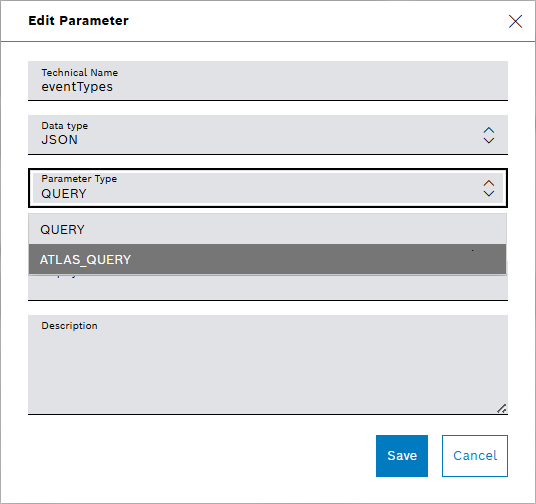
As a result, the backend converts MongoDB queries to Atlas Search queries. For more information about Atlas search, refer to Collections user guide.
February
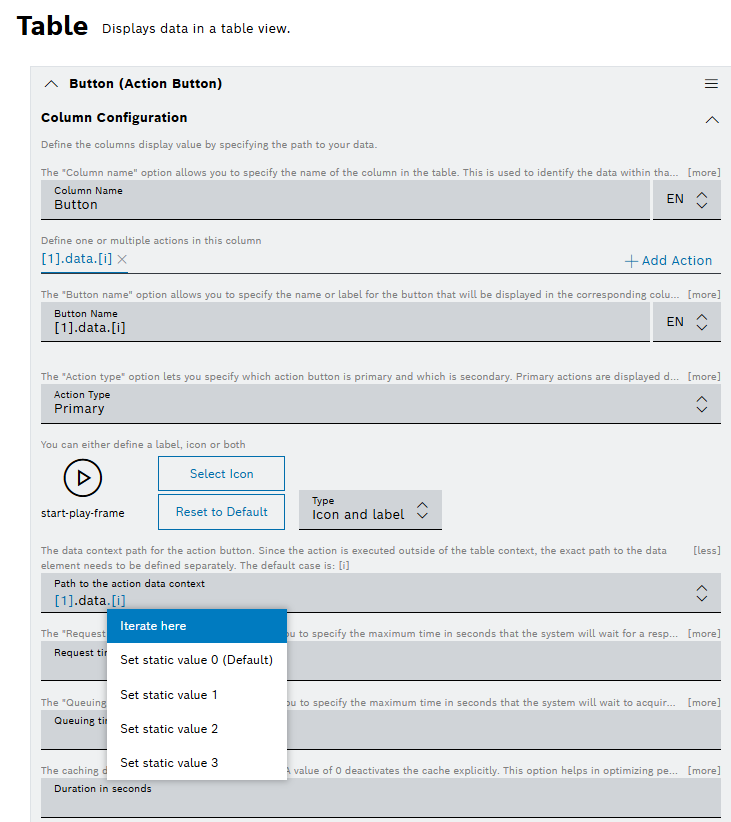
February 27, 2026: Table widget | Action Button column supported for sub iterator data source
The Action Button column supports the path to the context of the action data, so that you can define the nested item of the data for iteration:
Find more about configuring the settings of the Table widget in Configuring the table settings user guide.
February 26, 2026: Reprocessing Job API | Backward incompatible changes
Reprocessing Job API used instanceCount property to define the number of instances for a reprocessing job. A new deploymentSettings property has been introduced to define the number of instances, memory, and storage settings for a reprocessing job.
Breaking changes
Breaking changes
- Start a new reprocessing job(s) endpoint does not accept
instanceCountanymore. Now, the property is nameddeploymentSettings - Retrieve all reprocessing jobs endpoint does not provide
instanceCountanymore. Now, the property is nameddeploymentSettings - Retrieve a reprocessing job endpoint does not provide
instanceCountanymore. Now, the property is nameddeploymentSettings
Default values
For the instances in deploymentSettings property, the default value is 1.
For memory and storage, the default values are provided by the pipeline.
"deploymentSettings": {
"instances": 1,
"memory": 0,
"storage": 0
}
As a result, the following endpoints are affected:
/v2/{project}/pipeline/reprocessingJobs. For details, refer to Swagger U ./v2/{project}/pipeline/reprocessingJobs. For details, refer to Swagger UI./v2/{project}/pipeline/reprocessingJobs/{id}. For details, refer to Swagger UI.
The changes allow you define your own RAM and storage settings and change the default value of the number of instances. Find the reprocessing steps for updating these settings in the Reprocessing the input history user guide.
February 25, 2026: Reprocessing | Emit an event option added
The reprocessing is improved so that now you have the option to receive notifications by enabling the Emit an event checkbox in the re-processing dialog. By default, this option is disabled:
For more information about the reprocessing, refer to Reprocessing the input history user guide.
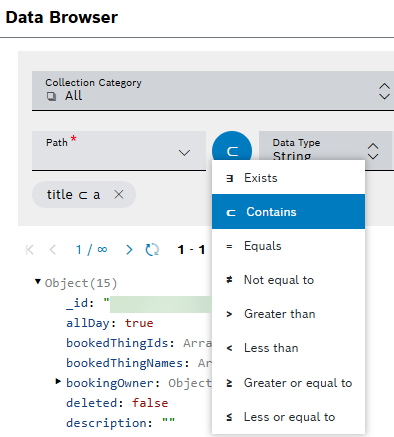
February 24, 2026: Data Browser search | Contains operator added to Operator selector button
The list with operators to select from is now increased with Contains operator:
For more information about the Data Browser, refer to Data Browser user guide.
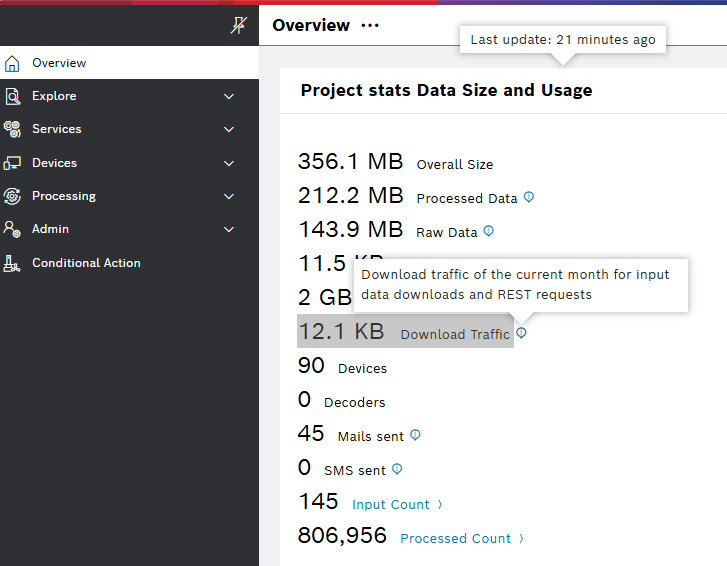
February 09, 2026: Overview | Download Traffic added in Project stats widget
We improved the Overview of a project with a new Download Traffic item in the Project stats widget. Now, it is easier for you to monitor the download volume of a project for the current month for data downloads and REST requests:
For more information about Project stats widget, refer to Project Stats user guide.
February 05, 2026: Data Recorder Service | The maximum total upload size increased
For resumable uploads via the Data Recorder Service, the maximum total upload size was increased from 50 to 256 GB.
Find more information about the Data Recorder Service and the resumable upload in Data Recorder Service developer guide.
February 04, 2026: Event Services and Event Notifications | Test Button added for Subscription Actions
Test buttons are now available for all subscription actions, based on the current configuration. For example:
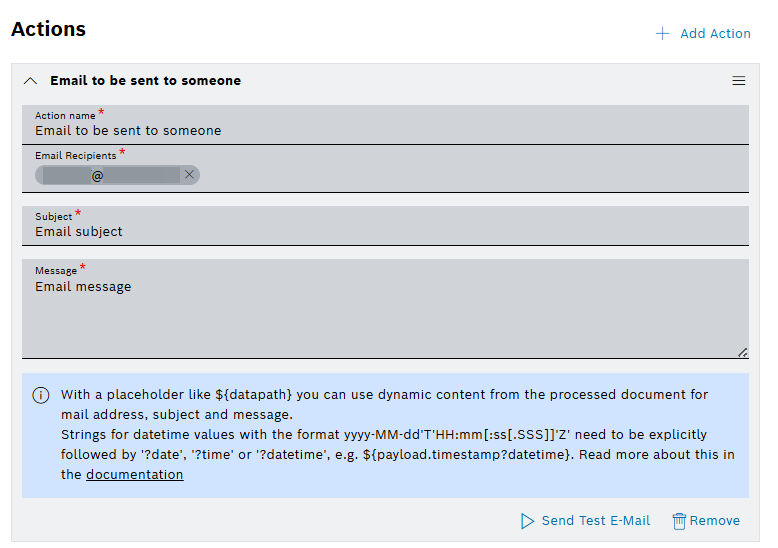
Use the following test buttons to validate your current configurations:
- Send Test E-Mail button sends the actual E-Mail.
- Send Test SMS sends the actual SMS – supported in Event Services.
- Send Test HTTP-Request button sends the actual REST request.
- Send Test Notification button creates the actual notification – supported in Event Notifications.
- Send Test Notification to myself button creates the actual notification, but only for the current user – supported in Event Services.
When the button is clicked it sends a request with the action definition and the example payload, which is shown on the UI, to the endpoint.
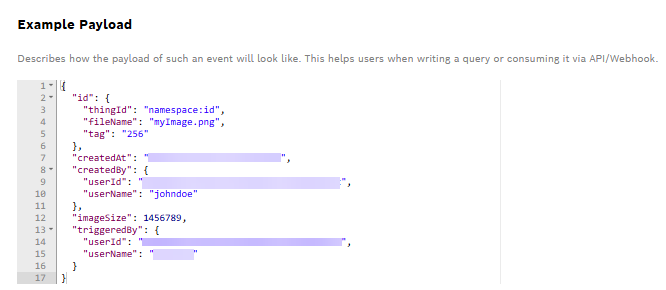
The status appears below the button showing the loading status and the result status or error: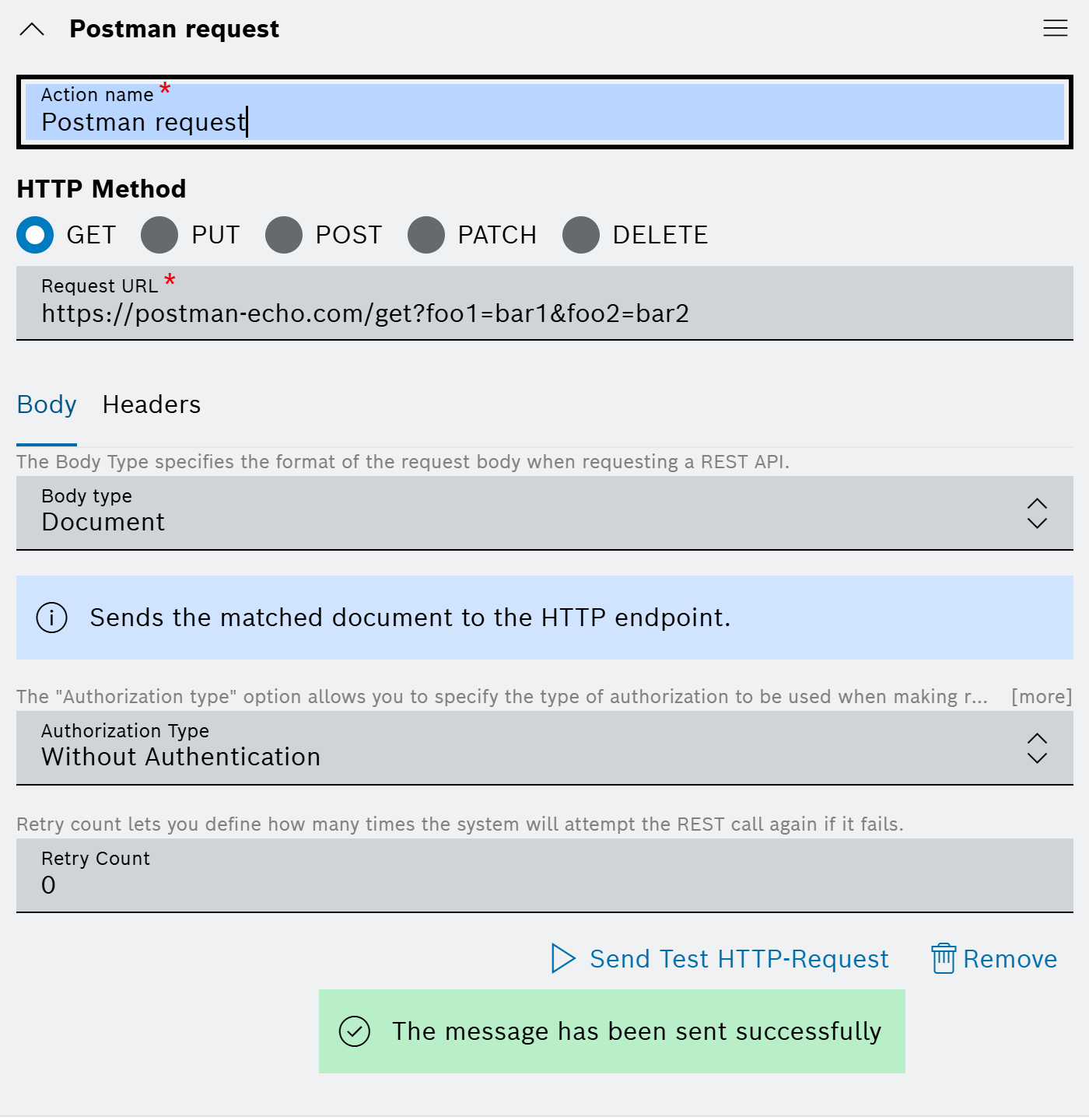
For more information about the Event Notification and Event services, refer to Event Notifications and Event Service user guides.
February 03, 2026: Breadcrumbs | Navigation improved with currentURL parameter
To spear you from manually adding the navigation path when dashboards navigate to the same detail views from different entry points, we have introduced a new context parameter currentUrl to the list of the default Insights parameters:
The parameter is available in the basic widget context. The following is an example of how to set the link with the ${insights.currentUrl} placeholder:
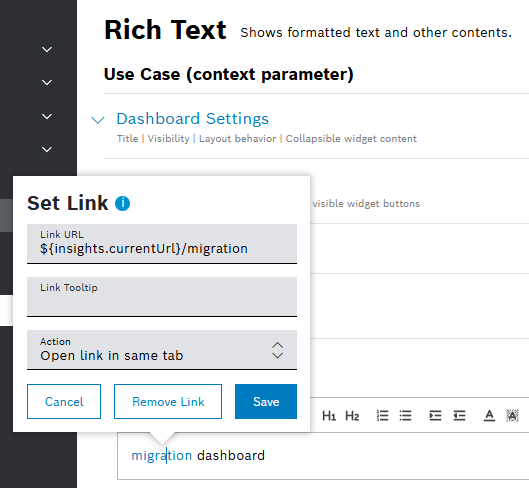
The new navigation context parameter currentUrl allows widgets to build URLs relative to the current dashboard path. Navigation using the current URL reference results in correct breadcrumb hierarchy as described in the following example:
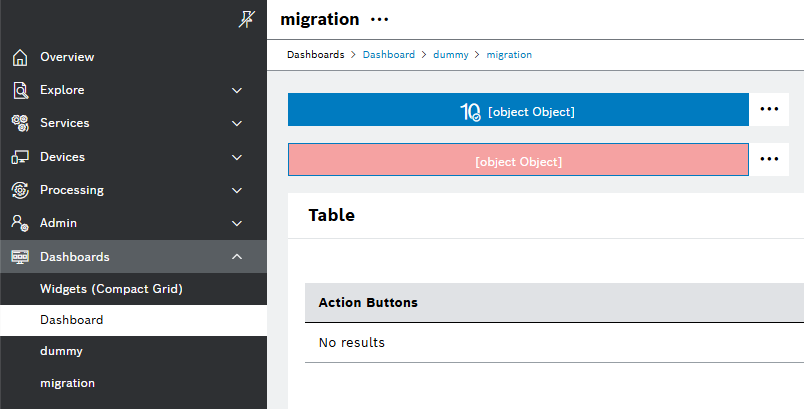
The dashboards of Widgets (Compact Grid) and Dashboard can both navigate to shared views, but via different URL paths. For example, migration can be reached through:
- /Widgets (Compact Grid)/dummy/migration
- /Dashboard/dummy/migration
Similarly, dummy can be accessed from both dashboards. The image below is a visualization of the shared migration detail view via Dashboard/dummy path:
For more information about the breadcrumbs, refer to the Nesting a dashboard section of Dashboards user guide.
February 02, 2026: Usage and Estimated Costs | New metric Download Traffic introduced
Requests to endpoints for downloading Input Data and requests based on customer-defined REST request definitions now unblock read tickets as soon as the download has started. The number of downloaded bytes is measured and billed per GB. The usage in GB is always rounded down. For the current pricing details, refer to the internal pricing information.
Previously, read tickets were blocked for the whole duration of input data downloads and REST requests, which caused other users' requests being blocked. This situation is now improved and the slow download speed does not impact the overall user experience in the mentioned cases anymore.
As a project administrator, you can monitor the accumulated download traffic per billing month by navigating to Admin > Usage and Estimated Costs > Metric, and selecting the new Download Traffic option from the drop-down menu:
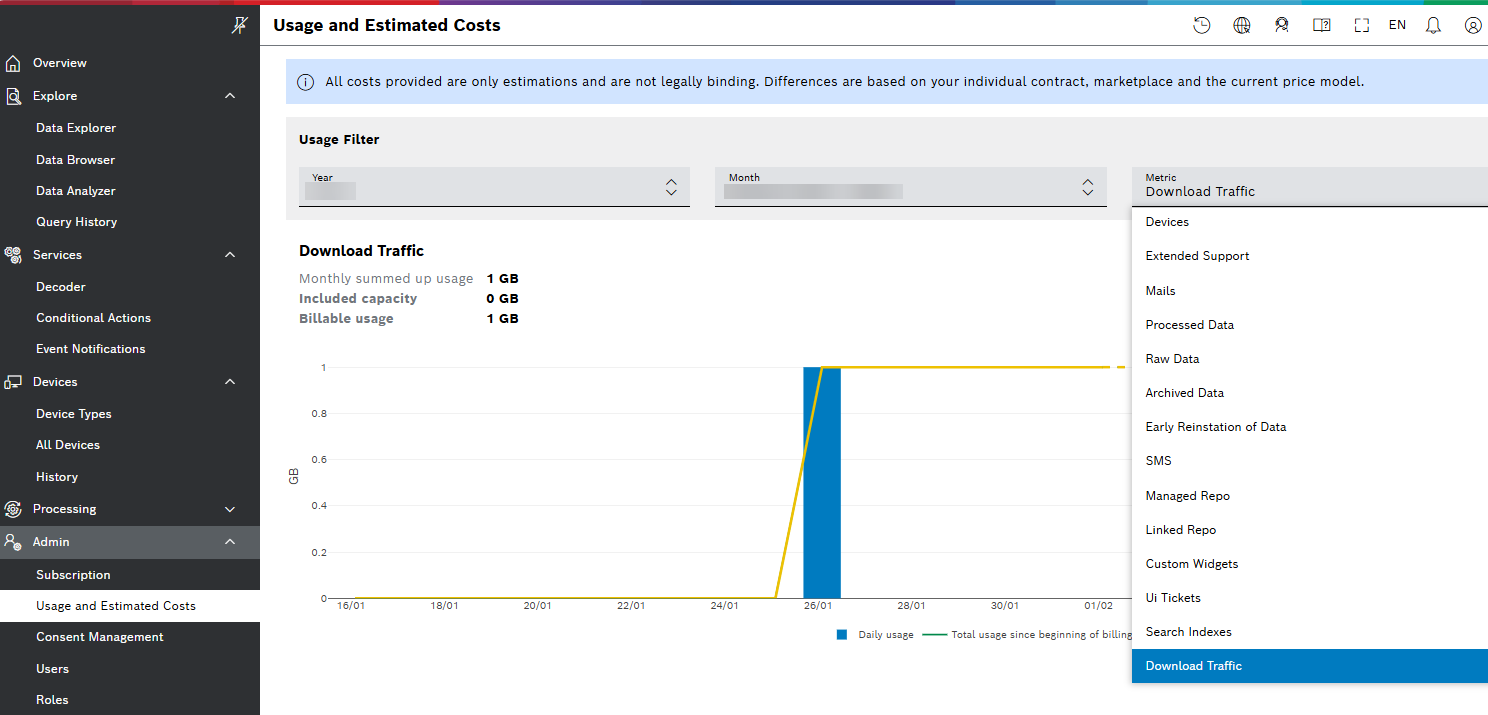
Starting with one of the next releases, we will enhance the Query History to provide you with more information about how download traffic is tracked.
January
January 27, 2026: Table widget | New parameter pageIndex supported
In the External Data Source, the list of parameters, namely pageSize, pageNumber, and pageOffset, is now extended with pageIndex. The pageIndex parameter is always one number lower than the pageNumber. Depending on your endpoint pagination, you can either use pageIndex or pageNumber.
If you use Bosch IoT Insights endpoints, it is preferable to use pageIndex parameter instead of pageNumber, as the respective endpoints use a Zero-based counter.
For details about Table widget, refer to Table widget user guide.
January 26, 2026: Feedback banner | Placeholders supported
Navigating to Admin > White Labeling > Basic Settings allows you to configure a feedback banner link for your dashboard. Now, the feedback link supports placeholders as the one of $(insights.user.id) in the example below:

For more information on the feedback banner and the White Labeling settings, refer to the Basic Settings user guide.
January 23, 2026: Collections | Atlas Search view added
The new Atlas Search view allows management of MongoBD indexes. Now, you can list, update, and delete existing indexes, and create new ones. Each index in a list can be expanded to reveal a read-only JSON editor displaying its configuration. The Atlas Search Index configuration is defined and managed using a JSON-based definition. The JSON editor supports Undo/Redo actions, Format (auto-formatting JSON), and Copy content.
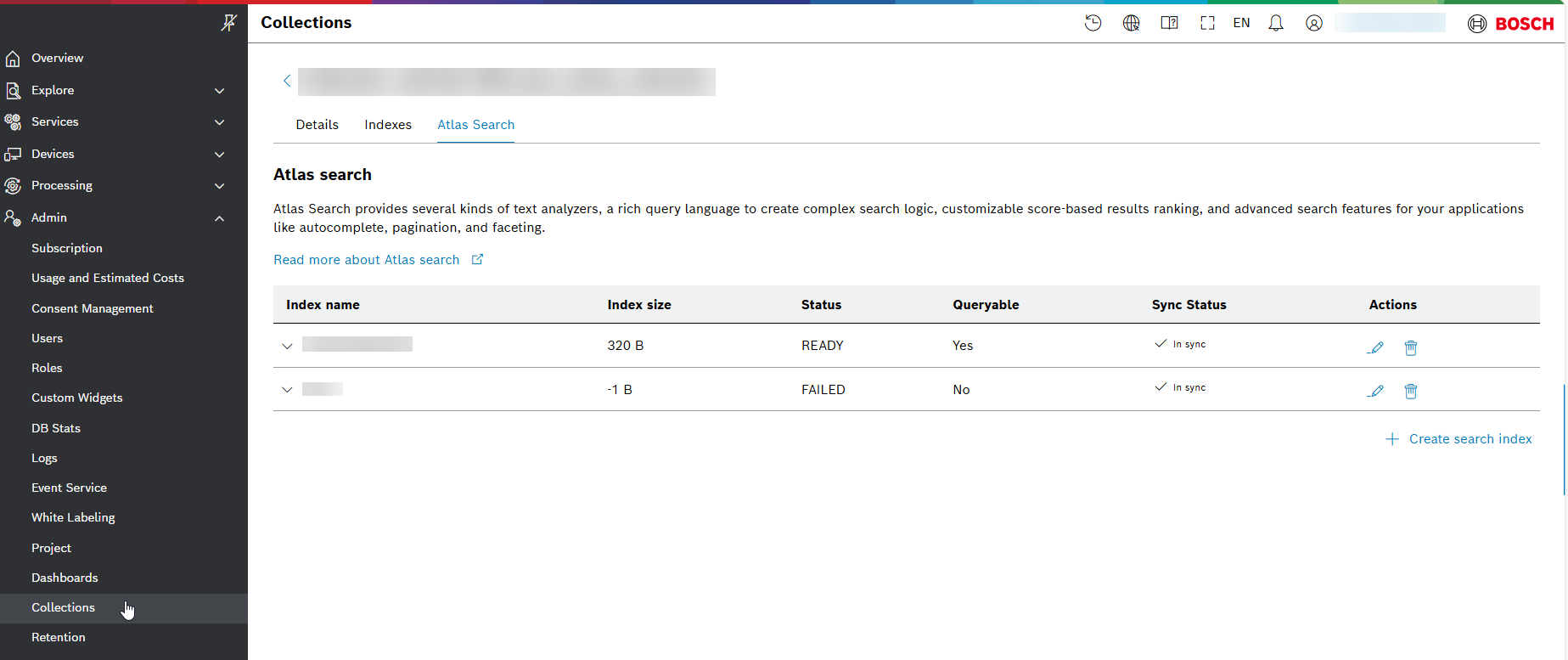
For general information, refer to MongoDB Search Overview - Atlas - MongoDB Docs.
For more information on Collections and the views of Details, Indexes, and Atlas Search, refer to Collections user guide.
January 22, 2026: Chart widgets | Personal reports available
The personal reports used to be applicable for Table widgets only. Now, you can configure personal reports in the same way as described in Personal Reports for your Chart widgets, too, starting from the User Menu  icon and selecting the respective option from the drop-down menu: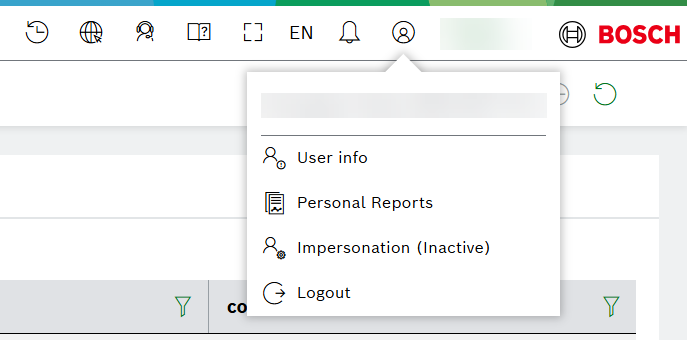
Additional parameters can be set up as described in Enabling additional parameters on Chart widgets level section of the Personal Reports guide: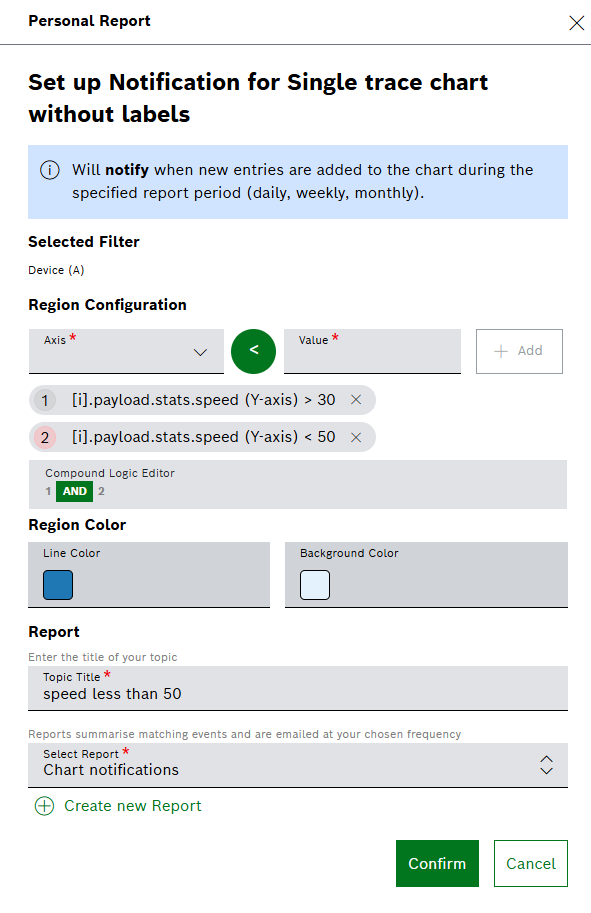
The visualization of the generated report may look like the following tunnel: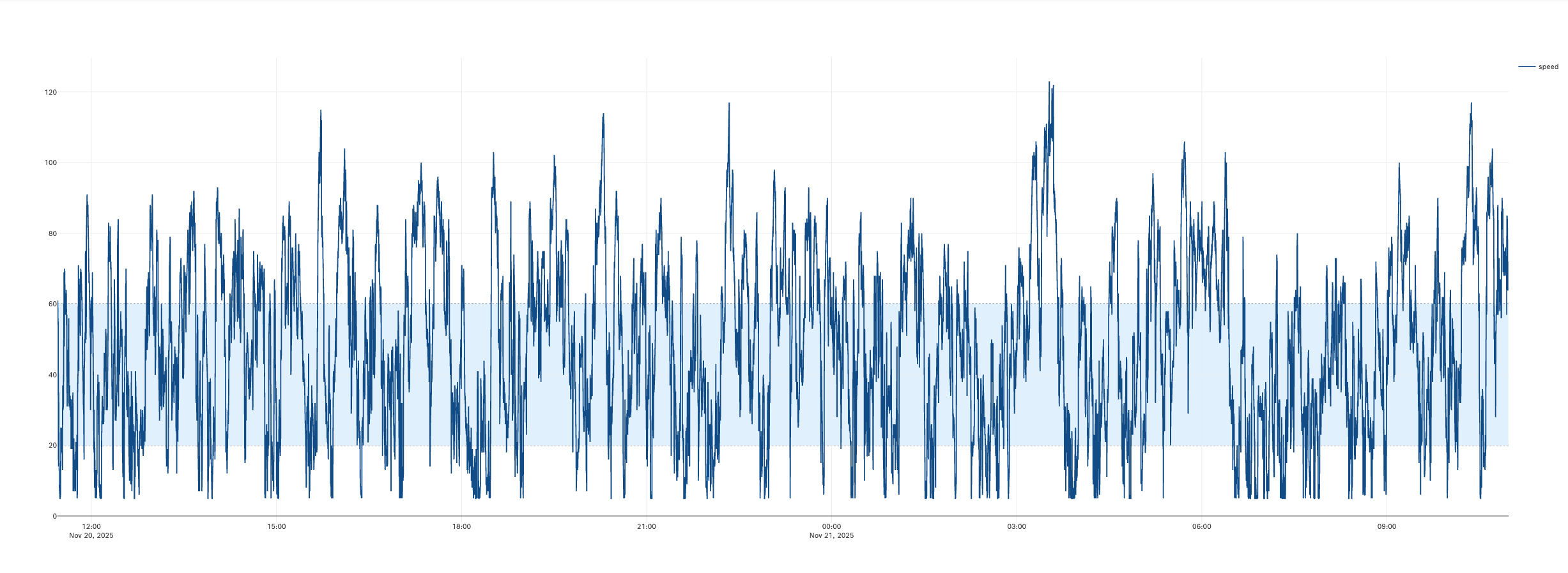
For more information about the chart widgets, refer to Chart widgets guide.
January 19, 2026: Data Transformation | Placeholder in JMES Path Query
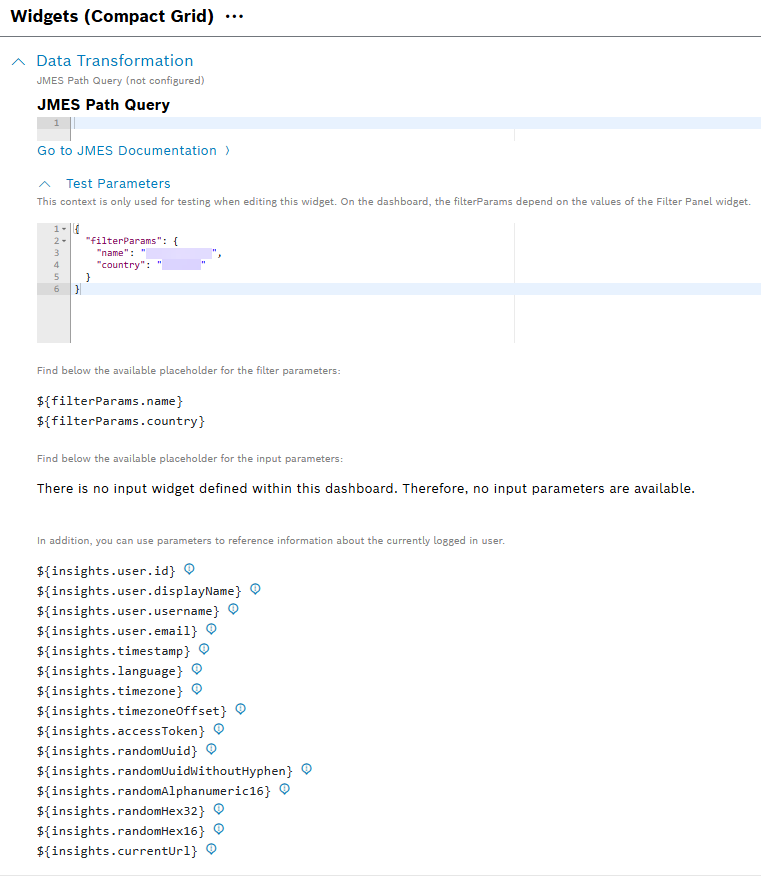
Now, JMES Path Query supports also non-data source placeholders like insights, filterParams, inputFields. Find more general information in JMESPath documentation.
You can configure your JMES Path Query from the Data Transformation pane. When editing a widget, you can view all available placeholders in the Test Parameters tab. See the example below::
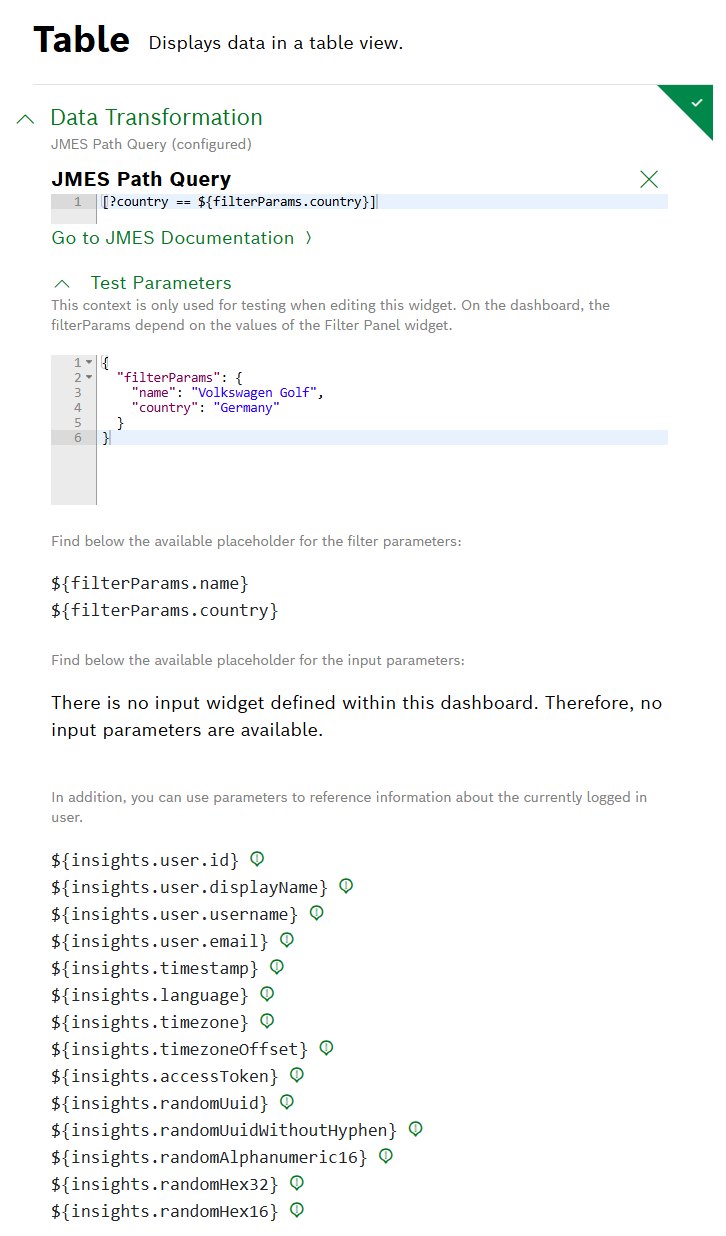
For more information about Data Transformation, refer to the respective Data Transformation section in each widget where available.
January 14, 2026: User APIs | New property naming
API users (technical users) used displayName property for their description. A new description property has been introduced to hold the description for API users. During this refactoring the internalName property was renamed to username, because it represents the Bosch IoT Insights wide unique username.
The name property was removed, because it was confusing which name was meant.
Breaking changes:
- Create API user endpoint, does not accept
displayNameanymore, now the property is nameddescription - Filtering for audit log and other user referenced can't be done by description of the API users, but by their
username/displayName.
Deprecated usages:
- User Management API to get users:
- Replaced
nameproperty withdisplayName - Replaced
internalNameproperty withusername - New property
descriptioncontains now what was indisplayNamefor API users
- Replaced
- Placeholders or references should be updated:
insights.user.internalNametoinsights.user.username - Placeholders or references should be updated:
insights.user.nametoinsights.user.displayName
Find more information in Users how-to guide.
January 13, 2026: Table widget | 'Clickable row' functionality extended to support multi action buttons
Regarding the Hyperlink/Action button options of the 'Clickable row' functionality, the drop-down list also displays all defined hyperlink or action buttons:
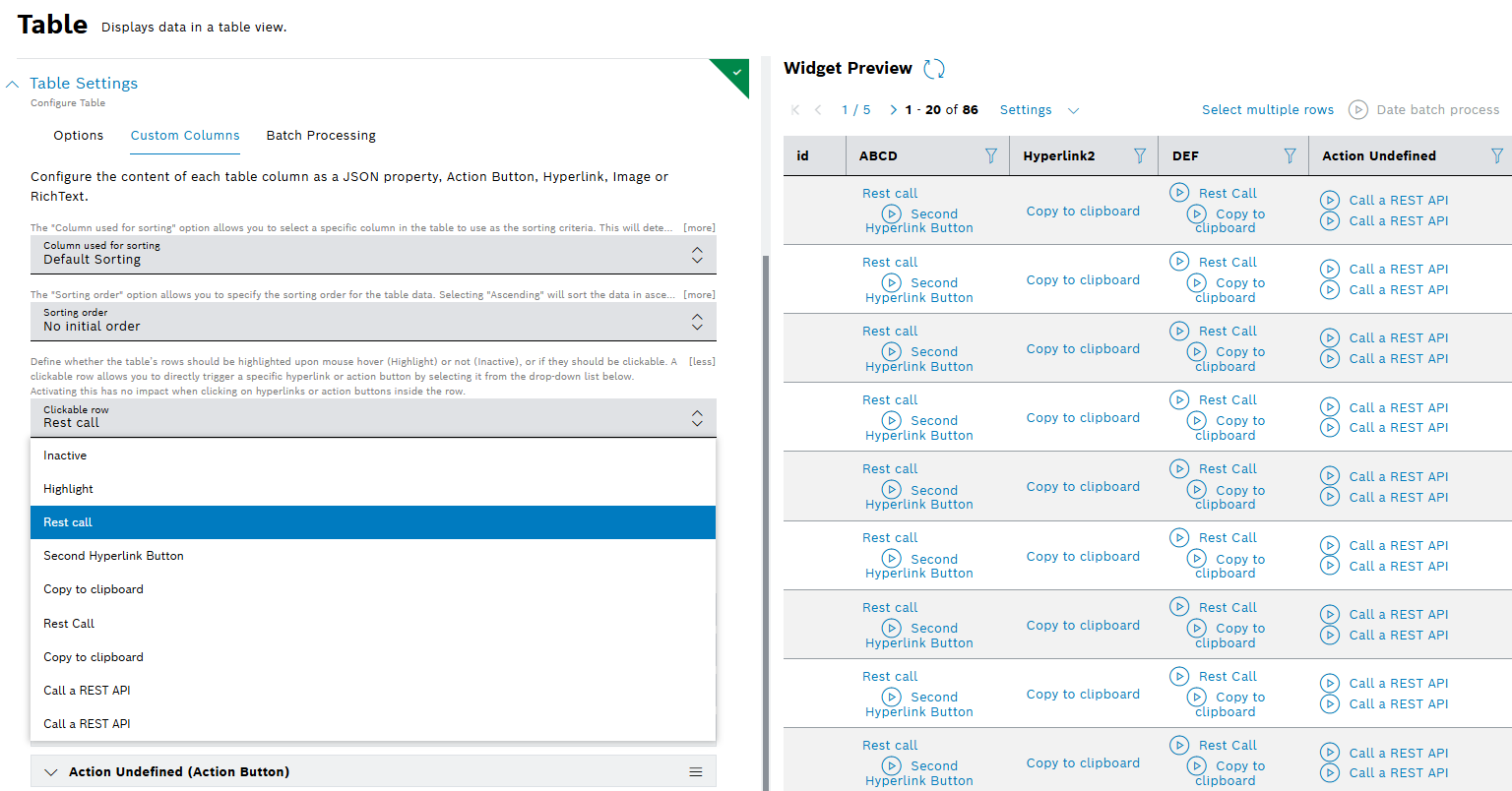
When clicking anywhere on a table's row, the selected action or hyperlink will be triggered or opened. The mouse cursor will indicate if a row is clickable. If other columns of the table also contain action buttons or hyperlinks, these can be clicked directly in the table. Clickable rows are highlighted by default upon mouse hover.
More information about Table widget is provided in Configuring the table settings user guide.